Benefits of load balancing WEKA
Implementing a dedicated load balancer for a WEKA S3 cluster environment provides three critical benefits:
- Eliminates the hot nodes problem: WEKA S3 scales throughput near-linearly by distributing data across multiple cluster containers simultaneously. However, S3 client applications do not naturally distribute their own traffic. Without a load balancer, multiple aggressive clients can target the same storage node, creating a hot node bottleneck that slows down the entire data pipeline. A load balancer evenly distributes S3 API requests across all available WEKA backend containers. This ensures every node is utilized efficiently and guarantees your storage actually hits the multi-million IOPS and line-rate NVMe speeds it is built for.
- Provides intelligent, storage-aware uptime: WEKA S3 architectures require a minimum of two containers to provide redundancy. If a container fails or falls out of sync, traffic must immediately stop routing to it. While a standard approach like Round-Robin DNS simply rotates through IP addresses blindly, it lacks the capability to detect if a specific node is underperforming or dead. A load balancer continuously probes WEKA’s specific health endpoints (such as
/wekas3api/health/ready). If a single container, filesystem, or network interface degrades, the load balancer instantly removes it from the rotation pool. New client connections are automatically directed to healthy nodes, avoiding failed or degraded containers. - Simplifies storage expansion and client management: As data pools expand, scaling a WEKA S3 cluster involves spinning up new protocol containers. Managing individual client configurations or repeatedly modifying complex network topologies every time you scale up is a massive administrative burden. A load balancer abstracts the entire WEKA storage layer behind a single, highly available virtual IP (VIP) address. S3 clients connect to one unified endpoint. When you scale your storage out by adding new WEKA containers, you simply register them behind the load balancer—allowing you to expand storage capacity and throughput non-disruptively with zero impact on client-side applications.
About WEKA
The WEKA S3 service is a scalable, resilient service that provides multi-protocol access to data.
The S3 service is implemented by specifying a set of storage hosts that you want to run the S3 protocol on and then creating a logical S3 cluster to expose the S3 service. As you define many hosts that serve the S3 protocol the S3 cluster scales to higher performance.
The WEKA S3 service works on top of the WekaFS file service. Buckets are mapped to (top-level) directories, and objects are mapped to files. Then, the same data can be exposed with either of the WEKA-supported protocols.
In the WEKA data platform architecture, S3 actually sits in two entirely different places depending on whether you are talking about how data is stored (the back end) or how data is accessed (the front end).
WEKA uses a zero-copy multi-protocol architecture, meaning S3 sits on both sides of the storage equation simultaneously; on the backend WEKA writes to an external S3 object store as its capacity tier, while on the frontend WEKA serves a native S3 API to clients.
The WEKA capacity tier backend
On the back end, S3 sits directly underneath WEKA’s ultra-fast NVMe flash layer, acting as a massive, cost-effective capacity tier.
WEKA presents a single, unified namespace to your applications, but internally it automatically splits data into two tiers:
- The hot tier (NVMe flash): Where new, active, or frequently changing data/metadata sits for maximum IOPS and ultra-low latency.
- The warm/cold tier (S3 object storage): An object store (like AWS S3, Azure Blob, or on-premises solutions like Scality RING or Cloudian) where inactive data automatically migrates based on time policies.
When an application writes data, it always lands on the fast NVMe flash layer first. Once data meets the configured tiering policy (based on data age and access patterns), WEKA moves it to the object store in the background. If an application requests that cold data again, WEKA transparently pulls it back up to the flash layer.
The WEKA access protocol front end
On the front end, S3 sits right alongside POSIX, NFS, SMB, and NVIDIA GPUDirect Storage (GDS) as an Inbound Access Protocol.
WEKA features a native, high-performance S3 API front-end. This means cloud-native applications, AI pipelines, or data lakehouses (like Snowflake) can read and write data directly to WEKA using standard S3 commands and clients (like boto3).
The WEKA multi-protocol
Because of where it sits, S3 access isn’t siloed. You can ingest millions of tiny files via the S3 protocol, and a GPU cluster can immediately read those exact same files using ultra-fast POSIX or GPUDirect Storage without needing to copy, move, or translate the data.
| Dimension | Where S3 sits | What it does |
|---|---|---|
| Data lifecycle back end | Underneath the local NVMe SSD tier | Acts as an exabyte-scale, cost-effective repository for cold data |
| Application layer front end | On top of the filesystem layer | Acts as a fast, native API endpoint for cloud-native applications to ingest or read data |
Why Loadbalancer.org for WEKA S3?
When you are running enterprise AI, machine learning, and high-performance computing (HPC) pipelines, your data is only as fast as your weakest link. A generic load balancer can easily bottleneck your high-speed WEKA architecture.
Loadbalancer.org delivers an enterprise-class application delivery solution officially validated by WEKA engineers to unlock the full potential of your NVMe storage tiers.
The power of vendor-validated integration
Don’t waste weeks on trial-and-error network tuning or risking critical downtime. Because our deployment architecture is co-designed and rigorously tested by WEKA’s own engineering teams, you get a solution that seamlessly aligns with WEKA’s high-concurrency, ultra-low-latency filesystem.
Key benefits for your WEKA infrastructure:
- Zero ‘hot node’ bottlenecks: Our solution is intelligently tuned to distribute S3 API requests evenly across all available frontend containers, ensuring predictable, linear performance scaling.
- Storage-aware health monitoring: Standard load balancers only check if a port is open. Loadbalancer.org utilizes WEKA-approved health checks to monitor the actual status of the underlying storage containers, instantly rerouting traffic if a node degrades.
- Blazing-fast, line-rate throughput: Skip the complex manual tuning — our validated GSLB configuration comes ready to sustain massive parallel data pipelines.
- Unified support, zero finger-pointing: Deploy with absolute confidence. Because our integration is officially validated, you get seamless, collaborative support from both Loadbalancer.org and WEKA engineers if troubleshooting is ever required.
By choosing Loadbalancer.org, you aren’t just buying a network appliance—you are deploying a highly specialized, vendor-approved extension of your WEKA data platform that guarantees maximum ROI on your storage and GPU investments.
How to load balance WEKA S3
Load balancing a WEKA S3 deployment requires no Virtual Services (VIPs).
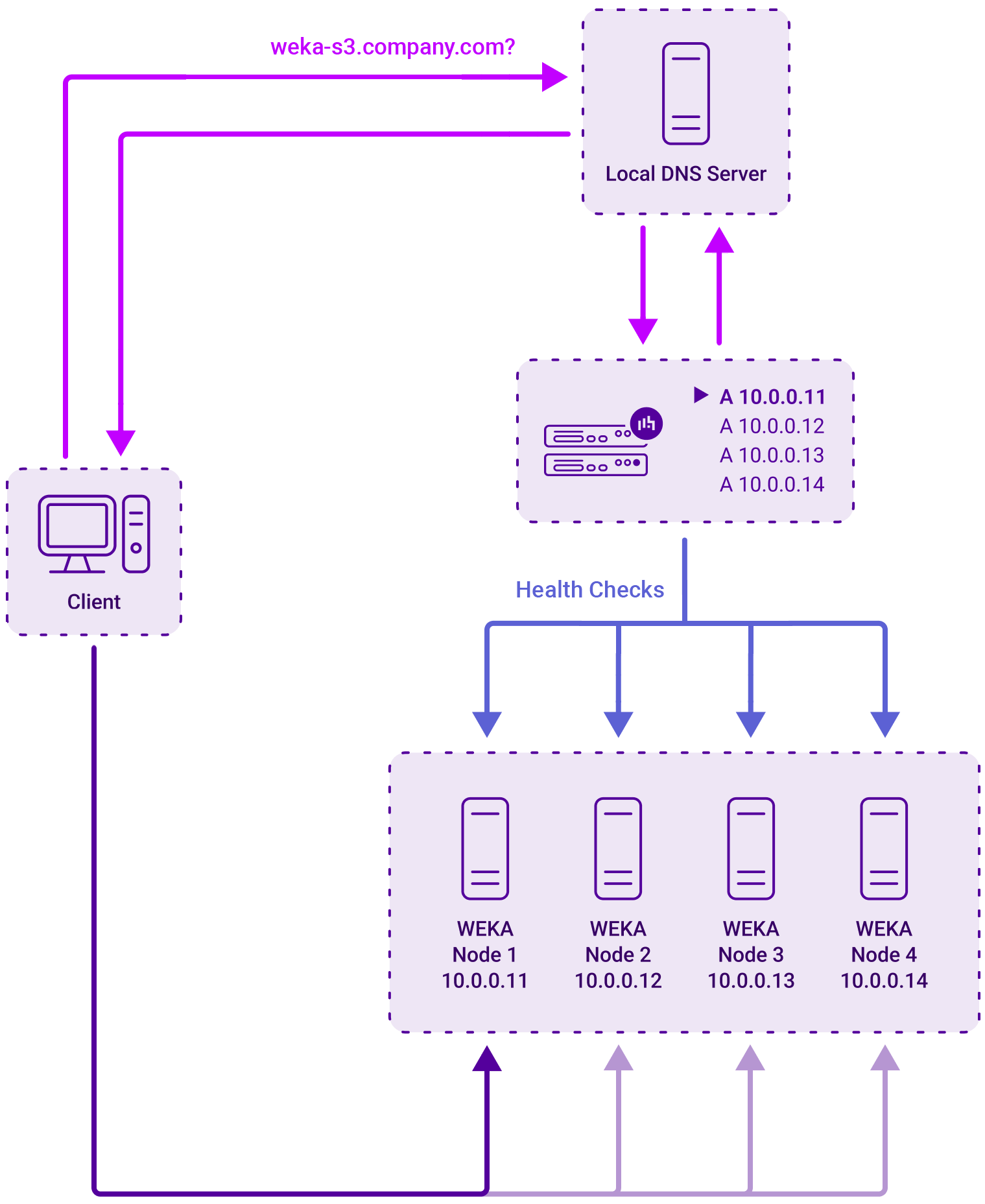
Instead, both load balancers are configured as smart DNS name servers for the FQDN of the WEKA S3 cluster address in question (e.g. wekas3.company.com). This is achieved using the load balancer’s built-in GSLB service and by using DNS delegation.
The GSLB service uses weighted round-robin load balancing to distribute inbound client connections across the healthy WEKA S3 nodes. The weights for the nodes can be set as required depending on relative node performance.
Health checks
Each WEKA S3 node is regularly health-checked by each load balancer and this information is used when providing the smart DNS response to inbound DNS queries.
Since the load balancers have no Virtual Services, there is no graphical overview of ‘healthy’ services to check and verify on the System Overview page of the WebUI. Instead, the GSLB configuration should be checked to ensure that the client is able to successfully resolve the service FQDN and connect to a healthy WEKA S3 node.
Deployment concept
The diagram below illustrates how the load balancer is deployed:
Appliance configuration for WEKA S3
The HA pair should be configured first, before the GSLB configuration takes place. This simplifies the process since GSLB settings will then be automatically replicated to the paired appliance. This helps ensure that both appliances are correctly configured and ready for sub domain delegation.
Once the HA pair is configured, the remaining configuration should take place on the Primary unit, the Secondary unit will then be kept in sync automatically.
For step-by-step instructions on how to do the following, refer to the WEKA deployment guide, below:
- Configure the HA Pair
- Configure the GSLB Health Check
- Configure GSLB