








Load balancing GE HealthCare True PACS
Updated on September 8, 2026
•
Published on August 15, 2023
Benefits of load balancing GE HealthCare True PACS
Load balancing GE HealthCare True PACS delivers a more resilient, high-performing and scalable True PACS solution:
- High Availability (HA): Load balancing is crucial for High Availability (HA). It distributes incoming traffic (like image retrieval requests or study ingestion) across multiple servers. If one server fails, the load balancer automatically redirects traffic to the remaining healthy servers, preventing downtime and ensuring that radiologists and clinicians maintain uninterrupted access to critical patient images and data.
- Optimized performance: By evenly distributing the workload, load balancing prevents any single server from becoming overloaded, which can cause slow response times. It helps reduce processing bottlenecks and server strain, particularly during peak hours or when handling large or complex studies. This ensures stable and optimal performance, which contributes to faster reading times and overall improved efficiency in the diagnostic workflow.
- Improved scalability: Load balancing allows the PACS environment to scale out easily by adding more servers as the volume of imaging data and the number of users grow. Features like “Pace and Balance” (which GE HealthCare integrates into True PACS) then use predictive analytics to intelligently distribute cases and balance the workload against available reading capacity, promoting fairness and helping to increase reading capacity without causing burnout. It allows the system to efficiently handle increased exam complexity and a growing number of users, ensuring the PACS can meet the evolving needs of a healthcare organization.
About GE HealthCare True PACS
GE HealthCare True PACS (TP) is a cloud-based solution that helps radiologists manage their workloads more securely and integrate AI applications seamlessly.
It brings together image visualization, workflow, AI, 3D post processing, and archiving in a single platform, providing enterprise functionality at an affordable price.
GE HealthCare True PACS (TP) helps support organizations in achieving enhanced productivity and diagnostic accuracy by natively integrating with AI-based decision support applications and incorporating intelligent workflow automation.
Why Loadbalancer.org for GE HealthCare applications?
Loadbalancer.org is a global solution for GE HealthCare application delivery, ensuring that their solutions are always on when healthcare providers need them most.
The longstanding strategic partnership between Loadbalancer.org and GE HealthCare has gone back many years and is a deeply technical alliance designed to reduce the complexity of delivering precision care.
By partnering with Loadbalancer.org, GE HealthCare is now able to provide its customers with more user-friendly load balancers that help to simplify their daily operations, allowing them to deliver faster, more cost-effective deployments.
Get the full story: GE healthcare reduces its support burden with a Loadbalancer.org partnership.
How to load balance GE HealthCare True PACS
The load balancer can be deployed in four fundamental ways: Layer 4 DR mode, Layer 4 NAT mode, Layer 4 SNAT mode, and Layer 7 Reverse Proxy (Layer 7 SNAT mode).
For GE True PACS, Layer 7 Reverse Proxy is recommended.
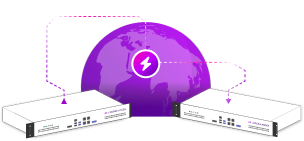
Load balancing deployment concept
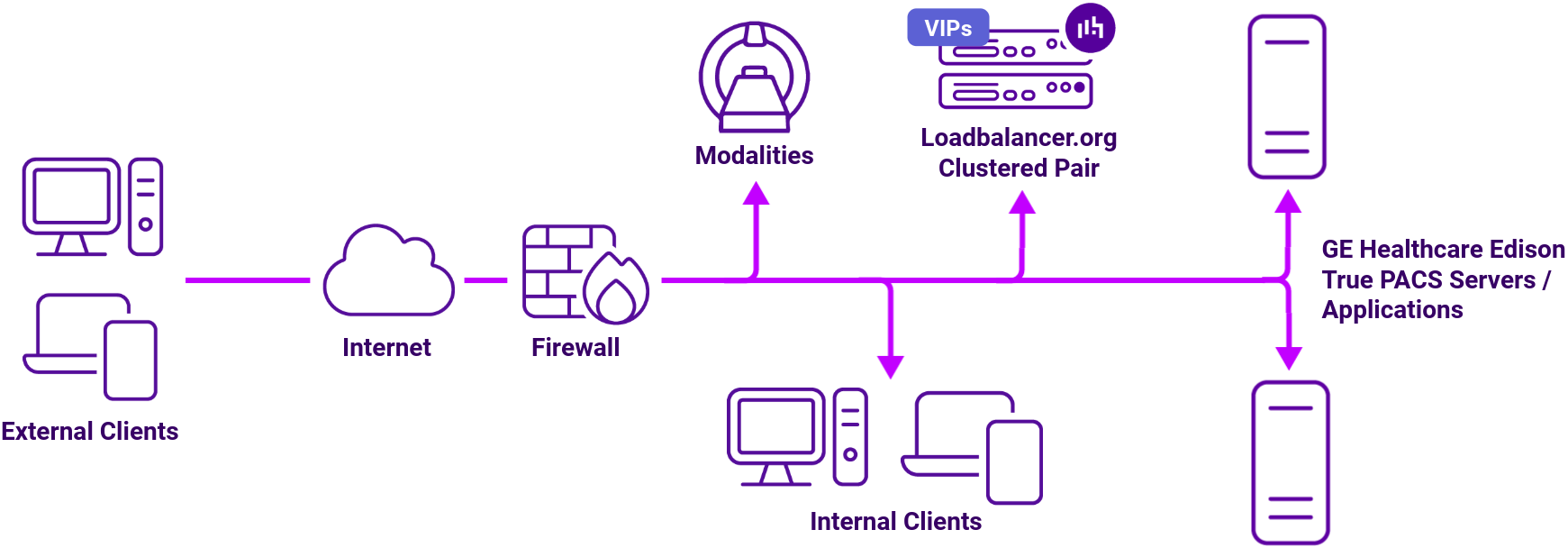
Virtual service (VIP) requirements (SP1 and SP2)
To provide load balancing and HA for True PACS, the following VIPs are required:
| Ref. | VIP Name | Mode | Port(s) | Persistence Mode | Health Check |
|---|---|---|---|---|---|
| VIP 1 | WFC_RMQAMQP | Layer 7 Reverse Proxy | 8081 | None | Connect to Port |
| VIP 2 | WFC_443 | Layer 7 Reverse Proxy | 8443 | None | No checks, Always on |
| VIP 2 – B1 | WFC_inference_443 | Backend only | – | None | HTTPS (GET) |
| VIP 2 – B2 | WFC_profiling_443 | Backend only | – | None | HTTPS (GET) |
| VIP 2 – B3 | WFC_patient_443 | Backend only | – | None | HTTPS (GET) |
| VIP 2 – B4 | WFC_CCS_443 | Backend only | – | None | HTTPS (GET) |
| VIP 2 – B5 | WFC_auth_443 | Backend only | – | None | HTTPS (GET) |
| VIP 2 – B6 | WFC_outboundhl7_443 | Backend only | – | None | HTTPS (GET) |
| VIP 2 – B7 | WFC_inboundnotification_443 | Backend only | – | None | HTTPS (GET) |
| VIP 2 – B8 | WFC_eventnotificationmanager_443 | Backend only | – | None | HTTPS (GET) |
| VIP 2 – B9 | WFC_outboundeventpolling_443 | Backend only | – | None | HTTPS (GET) |
| VIP 2 – B10 | WFC_metadata_443 | Backend only | – | None | HTTPS (GET) |
| VIP 2 – B11 | WFC_studymanagement_443 | Backend only | – | None | HTTPS (GET) |
| VIP 2 – B12 | WFC_xe_443 | Backend only | – | None | HTTPS (GET) |
| VIP 2 – B13 | WFC_recordmanager_443 | Backend only | – | None | HTTPS (GET) |
| VIP 3 | WFC_http | Layer 7 Reverse Proxy | 80 | None | No checks, Always on |
| VIP 3 – B1 | WFC_inference_80 | Backend only | – | None | HTTPS (GET) |
| VIP 3 – B2 | WFC_profiling_80 | Backend only | – | None | HTTPS (GET) |
| VIP 3 – B3 | WFC_CCS_80 | Backend only | – | None | HTTPS (GET) |
| VIP 3 – B4 | WFC_auth_80 | Backend only | – | None | HTTPS (GET) |
| VIP 3 – B5 | WFC_outboundeventpolling_80 | Backend only | – | None | HTTPS (GET) |
| VIP 3 – B6 | WFC_inboundnotification_80 | Backend only | – | None | HTTPS (GET) |
| VIP 3 – B7 | WFC_eventnotificationmanager_80 | Backend only | – | None | HTTPS (GET) |
| VIP 3 – B8 | WFC_metadata_80 | Backend only | – | None | HTTPS (GET) |
| VIP 3 – B9 | WFC_patient_80 | Backend only | – | None | HTTPS (GET) |
| VIP 3 – B10 | WFC_masterfileapp_80 | Backend only | – | None | HTTPS (GET) |
| VIP 3 – B11 | WFC_masterfiledata_80 | Backend only | – | None | HTTPS (GET) |
| VIP 3 – B12 | WFC_studymanagement_80 | Backend only | – | None | HTTPS (GET) |
| VIP 3 – B13 | WFC_xe_80 | Backend only | – | None | HTTPS (GET) |
| VIP 4 | WFC_10443 | Layer 7 Reverse Proxy | 8082 | None | No checks, Always on |
| VIP 4 – B1 | WFC_masterfiledata_10443 | Backend only | – | None | HTTPS (GET) |
| VIP 4 – B2 | WFC_masterfileapp_10443 | Backend only | – | None | HTTPS (GET) |
| VIP 4 – B3 | WFC_xeui_10443 | Backend only | – | None | HTTPS (GET) |
| VIP 5 | WFM_karaf_Group | Layer 7 Reverse Proxy | 9094 | Source IP | HTTPS (GET) |
| VIP 6 | SR_https_vs | Layer 7 Reverse Proxy | 3080 | None | HTTPS (GET) |
About Layer 7 Reverse Proxy load balancing
Layer 7 Reverse Proxy uses a proxy (HAProxy) at the application layer. Inbound requests are terminated on the load balancer and HAProxy generates a new corresponding request to the chosen Real Server. As a result, Layer 7 is typically not as fast as the Layer 4 methods.
Layer 7 is typically chosen when enhanced options such as SSL termination, cookie based persistence, URL rewriting, header insertion/deletion etc. are required, or when the network topology prohibits the use of the Layer 4 methods.
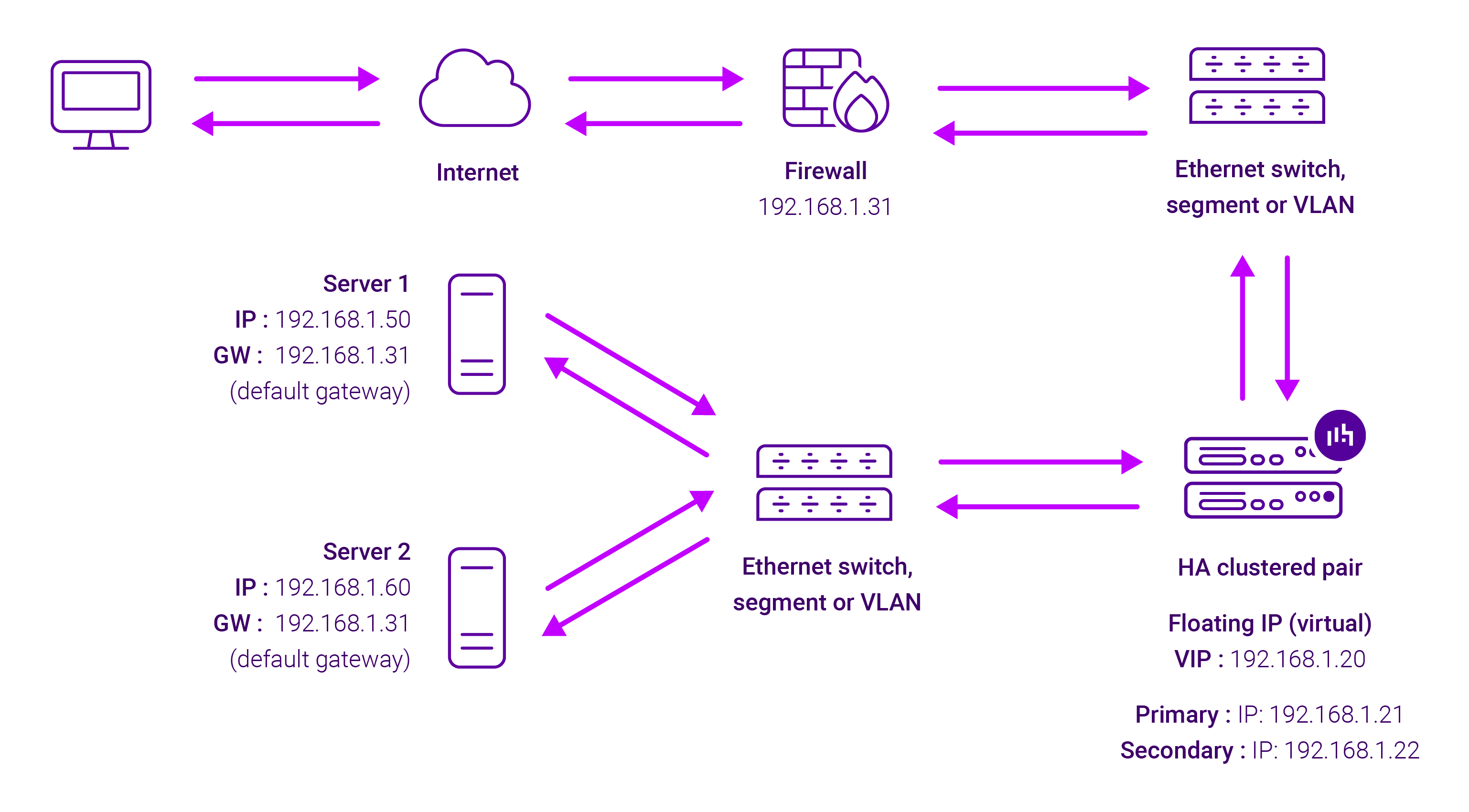
Because Layer 7 Reverse Proxy is a full proxy, any server in the cluster can be on any accessible subnet, including across the Internet or WAN.
Layer 7 Reverse Proxy is not transparent by default i.e. the Real Servers will not see the source IP address of the client, they will see the load balancer’s own IP address by default, or any other local appliance IP address if preferred (e.g. the VIP address). This can be configured per Layer 7 VIP.
If required, the load balancer can be configured to provide the actual client IP address to the Real Servers in two ways:
- Either by inserting a header that contains the client’s source IP address, or
- By modifying the Source Address field of the IP packets and replacing the IP address of the load balancer with the IP address of the client.
Layer 7 Reverse Proxy mode can be deployed using either a one-arm or two-arm configuration. For two-arm deployments, eth0 is normally used for the internal network and eth1 is used for the external network, although this is not mandatory.
No mode-specific configuration changes to the load balanced Real Servers are required.
Port translation is possible with Layer 7 Reverse Proxy e.g. VIP:80 → RIP:8080 is supported. You should not use the same RIP:PORT combination for Layer 7 Reverse Proxy VIPs and Layer 4 SNAT mode VIPs because the required firewall rules conflict.