








Load balancing GE HealthCare DoseWatch
Updated on September 8, 2026
•
Published on October 13, 2025
Benefits of load balancing DoseWatch
Load balancing GE HealthCare’s DoseWatch, provides critical benefits by ensuring the system’s reliability, performance, and scalability:
- High Availability (HA): Load balancing ensures that the application is always available for clinical use by preventing a single point of failure. If one server running the DoseWatch service were to fail or require maintenance, the load balancer instantly redirects all incoming dose data traffic and user requests to the remaining healthy servers. This seamless process prevents system downtime and ensures continuous dose monitoring, which is critical for patient safety and regulatory compliance.
- Improved performance: By distributing the workload across multiple servers, a load balancer prevents any single server from becoming a bottleneck, especially during peak hours when a high volume of imaging exams (and their corresponding dose reports) are being processed. Furthermore, load balancing leads to faster reporting and quicker identification of dose outliers by accelerating DoseWatch’s ingestion and analysis of radiation and contrast dose data. Users also experience reduced latency and quicker response times when accessing reports, querying the database, or launching the application.
- Scalability: Load balancing allows the DoseWatch infrastructure to grow easily and cost-effectively as a healthcare organization’s needs increase. As new hospitals join the network or as the volume of imaging procedures increases, administrators can simply add more servers to the cluster. The load balancer automatically incorporates the new resources and distributes the load, ensuring the system can handle larger data volumes without performance degradation. It provides a mechanism for IT teams to reliably manage and predict the system’s capacity, making it easier to plan for future growth and upgrades.
About GE HealthCare’s DoseWatch
GE HealthCare’s DoseWatch is a comprehensive system that centralizes radiation and contrast dose data from medical devices and PACS, regardless of modality or manufacturer. It’s designed to automatically spot dosing outliers, help determine their root cause, and generate the necessary documentation for anomaly review.
Why Loadbalancer.org for GE HealthCare applications?
Loadbalancer.org is a global solution for GE HealthCare application delivery, ensuring that their solutions are always on when healthcare providers need them most.
The longstanding strategic partnership between Loadbalancer.org and GE HealthCare has gone back many years and is a deeply technical alliance designed to reduce the complexity of delivering precision care.
By partnering with Loadbalancer.org, GE HealthCare is now able to provide its customers with more user-friendly load balancers that help to simplify their daily operations, allowing them to deliver faster, more cost-effective deployments.
Get the full story: GE healthcare reduces its support burden with a Loadbalancer.org partnership.
How to load balance GE HealthCare DoseWatch
The load balancer can be deployed in four fundamental ways: Layer 4 DR mode, Layer 4 NAT mode, Layer 4 SNAT mode, and Layer 7 Reverse Proxy (Layer 7 SNAT mode). For GE HealthCare DoseWatch, Layer 4 SNAT mode is recommended.
Virtual service (VIP) requirements
To provide load balancing and HA for DoseWatch, the following VIPs are required:
| Ref. | VIP Name | Use | Mode | Port | Persistence mode | Health check |
|---|---|---|---|---|---|---|
| VIP 1 | DATALINK_POOL1 | DoseWatch DataLink Main Listener (Raw or all) | Layer 4 SNAT | 2001 | Source IP | External script |
| VIP 2 | DATALINK_POOL2 | Optional DoseWatch DataLink Alternative Listener (RDSR or all) | Layer 4 SNAT | 2003 | Source IP | External script |
| VIP 3 | DATALINK_POOL3 | Optional DoseWatch DataLink MPPS Listener (MPPS or all) | Layer 4 SNAT | 2002 | Source IP | External script |
Load balancing deployment concept
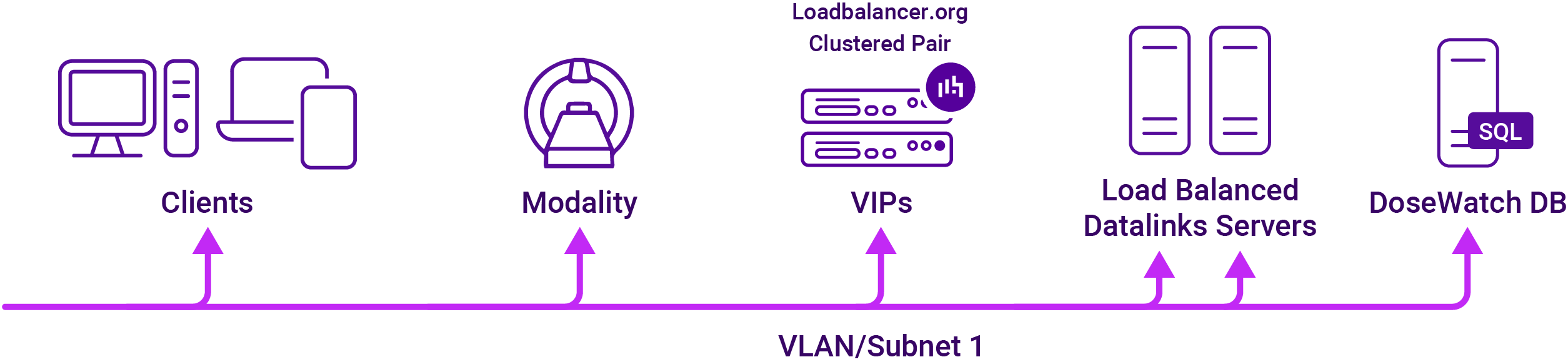
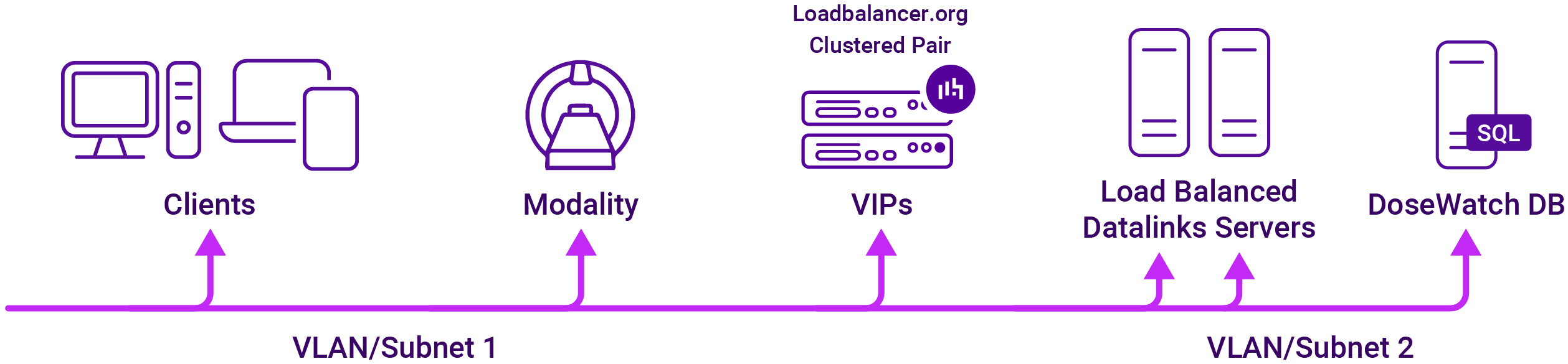
Both two-arm mode and single-arm mode are supported. If two-arm mode is required, an additional network interface can be added once the appliance has been deployed and initial network configuration has been completed.
Single-arm mode
Two-arm mode
About Layer 4 SNAT mode load balancing
Layer 4 SNAT mode is a high performance solution, although not as fast as Layer 4 NAT mode or Layer 4 DR mode. Layer 4 SNAT mode VIPs do not require any mode specific configuration changes to the load balanced Real Servers (DW Servers).
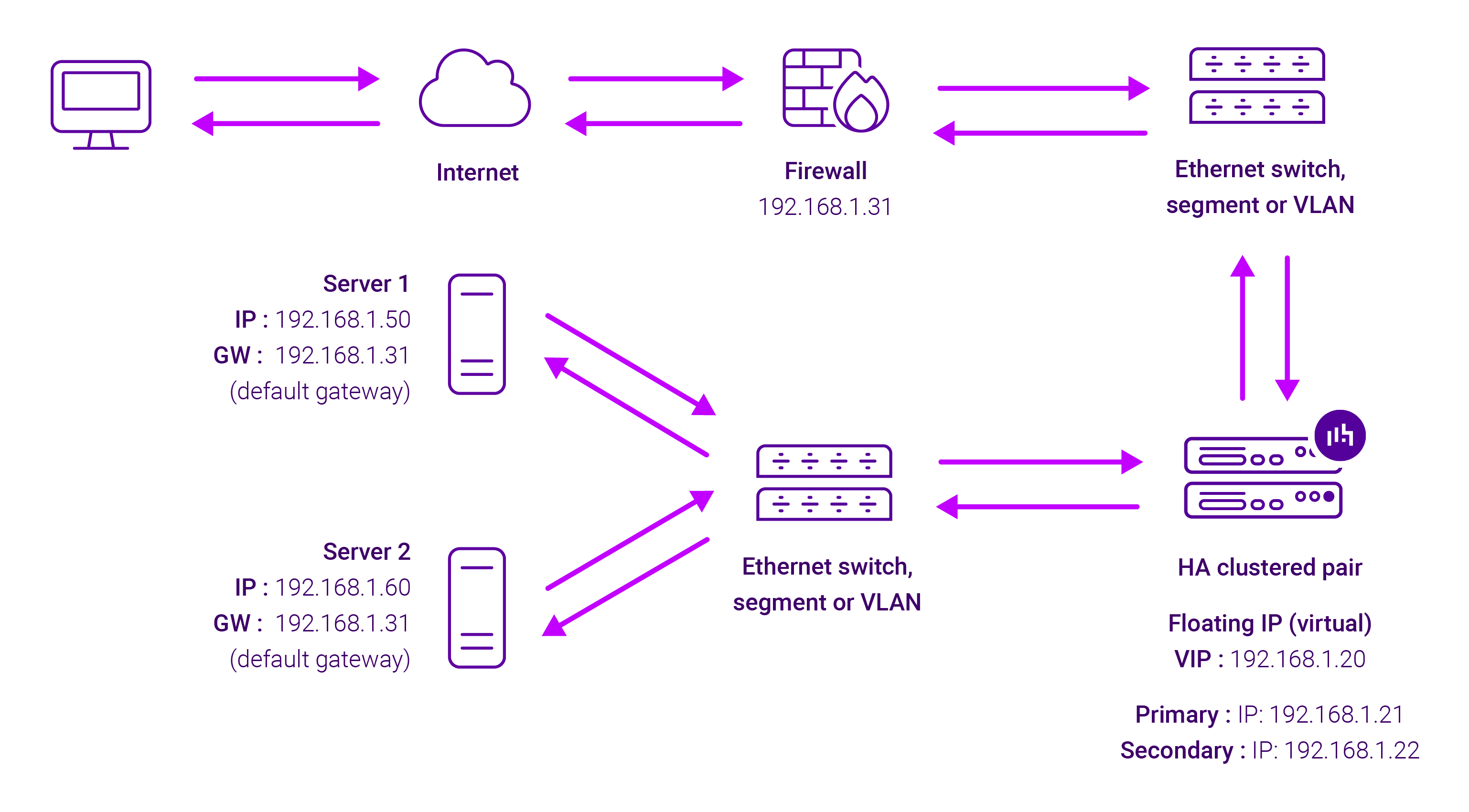
Real Servers in the cluster can be on any accessible network including across the Internet or WAN.
Layer 4 SNAT mode is not transparent, an iptables SNAT rule translates the source IP address to be the load balancer rather than the original client IP address. Layer 4 SNAT mode can be deployed using either a one-arm or two-arm configuration.
For two-arm deployments, eth1 is typically used for client side connections and eth0 is used for Real Server connections, although this is not mandatory since any interface can be used for any purpose. Requires no mode-specific configuration changes to the load balanced Real Servers. Port translation is possible with Layer 4 SNAT mode, e.g. VIP:80 → RIP:8080 is supported.
You should not use the same RIP:PORT combination for Layer 4 SNAT mode VIPs and Layer 7 Reverse Proxy VIPs because the required firewall rules conflict.