












The IaaS hyperscalers (AWS, Azure and GCP) all claim to provide ‘seamless’ load balancing with a single click. But as your architecture grows (spanning multiple regions, hybrid environments, or multi-cloud clusters), those ‘simple’ native tools often hit a wall. Whether it's a lack of deep packet inspection, the inability to ‘lift and shift’ your routing rules, or the frustration of the so-called ‘80% Rule’, enterprise traffic management is rarely as simple as a checkbox.
Choosing the right load balancer is about more than just moving traffic; it’s about avoiding vendor lock-in, cost control, security and multi-cloud resilience.
For enterprise, the market is split into two distinct offerings: cloud-native services like AWS, Azure and GCP, tailored to each ecosystem, and third-party, cloud-agnostic appliances built for consistency.
This guide explores the best cloud load balancers on the market today, comparing the native stacks of the Big Three IaaS providers (AWS, Azure and GCP) against third-party, virtual alternatives, to help you find the right fit for your use case.
What you'll learn:
- The best cloud load balancer ultimately depends on your architecture.
- AWS often comes out on top for EC2-heavy environments.
- GCP offers the best global anycast performance.
- Azure is worth considering if you're building primarily on AKS, VMSS or want close Microsoft integration.
- For multi-cloud consistency and avoiding vendor lock-in, a third-party, cloud-agnostic ADC is essential.
Table of contents
- What is cloud load balancing
- Best cloud load balancer for AWS
- Best cloud load balancer for Azure
- Best cloud load balancer for GCP
- AWS, Azure vs GCP load balancer comparison
- Best cloud load balancer for multi-cloud
- Best cloud load balancer for security
- Best cloud load balancer for cost
- Hang on, what about Cloudflare?
What is cloud load balancing?
Cloud load balancing is a distributed service that manages traffic across regional and global resources, providing solutions such as:
- High Availability: They manage the distribution of traffic and computing resources across virtual server pools.
- Scalability: They facilitate horizontal scalability by seamlessly integrating newly provisioned instances into the rotation.
- Performance: They evenly distribute traffic to maximize throughput and minimize latency.
Unlike traditional hardware, modern cloud load balancers operate across multiple layers (L3–L7) and often integrate with DNS and Content Delivery Networks (CDNs) to ensure high availability and low latency.
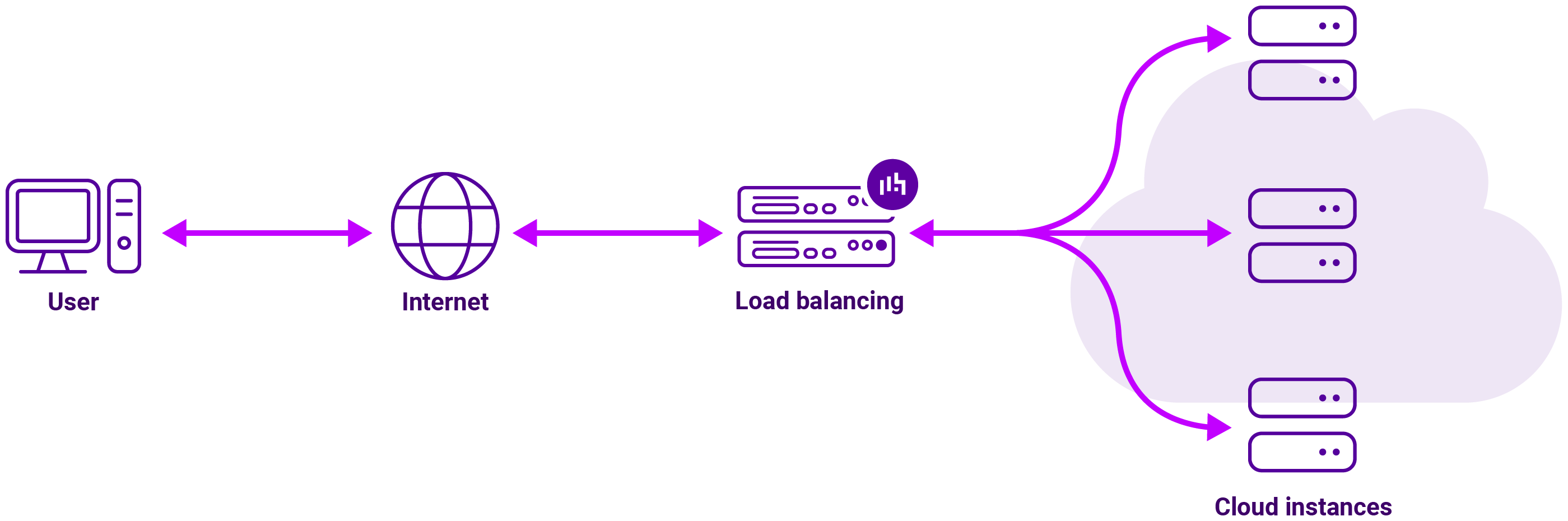
How does cloud load balancing differ from traditional server load balancing?
Traditional server load balancing and cloud load balancing share the same primary goal (distributing traffic to prevent server overload) but they differ fundamentally in architecture, scalability, and management.
While traditional on-premise load balancing relies on ‘racking and stacking’ physical appliances, cloud load balancing is a software-defined service integrated into a global network.
| Feature | Traditional (On-Premise) | Cloud Load Balancing |
|---|---|---|
| Infrastructure | Physical hardware appliances or dedicated servers. | Software-defined, fully managed service provided by the cloud vendor. |
| Scalability | Limited. Requires buying and installing new hardware to scale up. | Elastic. Automatically scales up or down instantly based on real-time traffic. |
| Cost Model | CapEx. High upfront cost for hardware and ongoing maintenance. | OpEx. Pay-as-you-go based on usage (bandwidth and rules). |
| Deployment | Takes weeks/months (procurement, cabling, config). | Takes minutes to provision via console or API. |
| Maintenance | Manual firmware updates, hardware repairs, and cooling. | Managed by the provider (Google, AWS, Azure). No hardware to manage. |
| Availability | Dependent on local redundancy (N+1 hardware). | Built-in global redundancy and automatic multi-region failover. |
| Control | Full control over every hardware and software setting. | Configurable via software, but underlying infrastructure is black-boxed. |
What’s the difference between a cloud-native and cloud-agnostic cloud load balancer?
Cloud‑native load balancing services found built-in to public cloud providers like AWS, Azure and GCP are tailored to each provider, and offer a one-click setup and automatic scaling.
They are:
- Fully managed and tightly integrated with each platform’s autoscaling, observability, security and container stack.
- Designed for massive scale, multi‑AZ or global availability, and pay‑per‑usage economics.
Meanwhile, third‑party, cloud-agnostic cloud load balancers, such as those provided by Loadbalancer.org, are independent software solutions that work identically across any cloud or on-premise environment, preventing vendor lock-in.
They are:
- A full ADC you manage as a VM appliance, with rich L4/L7 features, WAF, GSLB and detailed health‑check and persistence options.
- Consistent across environments, providing the same UI and behaviour in on‑prem, AWS, and Azure (with GCP currently single‑node).
In this sense, native load balancers compete on integration, simplicity, and cloud‑first workflows; Loadbalancer.org competes on feature depth, operational consistency across clouds, and vendor support.
So which one do you need?
We’ll dive into a side-by-side comparison of AWS, Azure and GCP load balancer offerings shortly. But first, a critical question:
If your cloud provider already offers a built-in load balancing add-on, why would you even think about buying a third-party solution?! The answer lies in the trade-off between the convenience, commercials and control needed for your use case.
Why built-in, cloud-native load balancers aren’t always the right choice
Many cloud providers offer their own, cloud-native, load balancer add-ons. But while these are convenient and easy to spin up, they often lack the depth required for complex, high-scale, or multi-cloud architectures.
The bottom line? Built-in isn’t always better for these reasons:
- Vendor lock-in and lack of portability: With cloud-native load balancers, moving to a different cloud or adopting a multi-cloud strategy is incredibly painful. You can’t simply 'lift and shift' your routing rules, security policies, or automation scripts because the load balancing architecture is unique to each cloud. This means you’re forced to re-architect your traffic management layer every time you want to expand to a new environment.
- Limited visibility and observability: Troubleshooting complex issues—like microbursts of traffic or specific API errors—can be difficult. You typically don’t get deep packet inspection, detailed transaction logs, or the ability to trace a request’s full journey through the load balancer in real-time without expensive add-ons. This results in a slower Mean Time to Resolution (MTTR) during outages and performance degradation.
- The 80% Rule: You might find yourself missing critical capabilities like advanced WAF (Web Application Firewall) customization, complex traffic mirroring, sophisticated rate limiting logic, or support for legacy protocols. This places additional burdens on engineering teams, requiring them to build workarounds to plug feature gaps. For example, native load balancers often lack advanced HTTP header manipulation, forcing engineers to use sidecars to compensate, adding unnecessary complexity.
Let’s do a deep-dive of each of the main hyperscalers to illustrate this.

Best cloud load balancer for AWS
What does the AWS Elastic Load Balancing (ELB) portfolio offer?
AWS has two main load balancer types:
- Application Load Balancer (ALB): Layer 7 HTTP/HTTPS/gRPC, with host/path‑based routing, header and query‑based rules, WebSockets, HTTP/2, and deep integration with ECS, EKS and Lambda targets.
- Network Load Balancer (NLB): Layer 4 TCP/UDP/TLS with static IPs, ultra‑low latency and very high throughput, ideal for non‑HTTP protocols and real‑time workloads.
In a traditional setup the ALB or NLB load balancer is the destination. The client talks to the load balancer, the load balancer terminates that connection, before then starting a new connection to the server.
AWS also offers the following (although the Classic Load Balancer is a legacy solution, and the Gateway Load Balancer isn't a reverse proxy, operates at Layer 3 and forward packets instead of changing the source or destination IP):
- Gateway Load Balancer (GWLB): IP‑level load balancer for inserting and scaling virtual network appliances (firewalls, IDS/IPS) using GENEVE encapsulation.
- Classic Load Balancer (CLB): Legacy L4/7 load balancer retained mainly for older EC2‑Classic and simple apps; not available for new designs.
Collectively, AWS load balancers are referred to as Elastic Load Balancers (ELBs), a generic term encompassing all AWS load balancers, although personally I find this catch-up all term unhelpful given the very different solutions on offer.
Redundancy and scalability are fully managed, and each load balancer type is inherently multi‑AZ within a region, scales automatically, and integrates tightly with EC2 auto scaling and container services.
Path-based vs. host-based routing
The AWS Application Load Balancer (ALB) operates at the Application Layer (Layer 7), which allows it to make intelligent routing decisions based on the content of the HTTP/HTTPS request in the following ways:
- Host-based routing: The ALB routes traffic based on the domain name in the request. This allows you to host multiple websites or services with different domains behind a single load balancer, saving costs on infrastructure.
- Path-based routing: The ALB routes traffic based on the URL path after the domain. This is critical for microservices architectures, where a single entry point (one domain) serves many different independent services.
AWS Lambda functions
Traditionally, load balancers sent traffic to 'always-on' resources like EC2 instances or containers (ECS). A major selling point of the AWS ALB is the ability to register AWS Lambda functions as a target. More on the benefits of AWS Lambda.
So how do the AWS ALB and NLB compare to a cloud-agnostic load balancers such as Loadbalancer.org?
What does a third-party load balancer offer in AWS?
Let's take Loadbalancer.org as an example third-party, cloud load balancing provider so we can talk specifics.
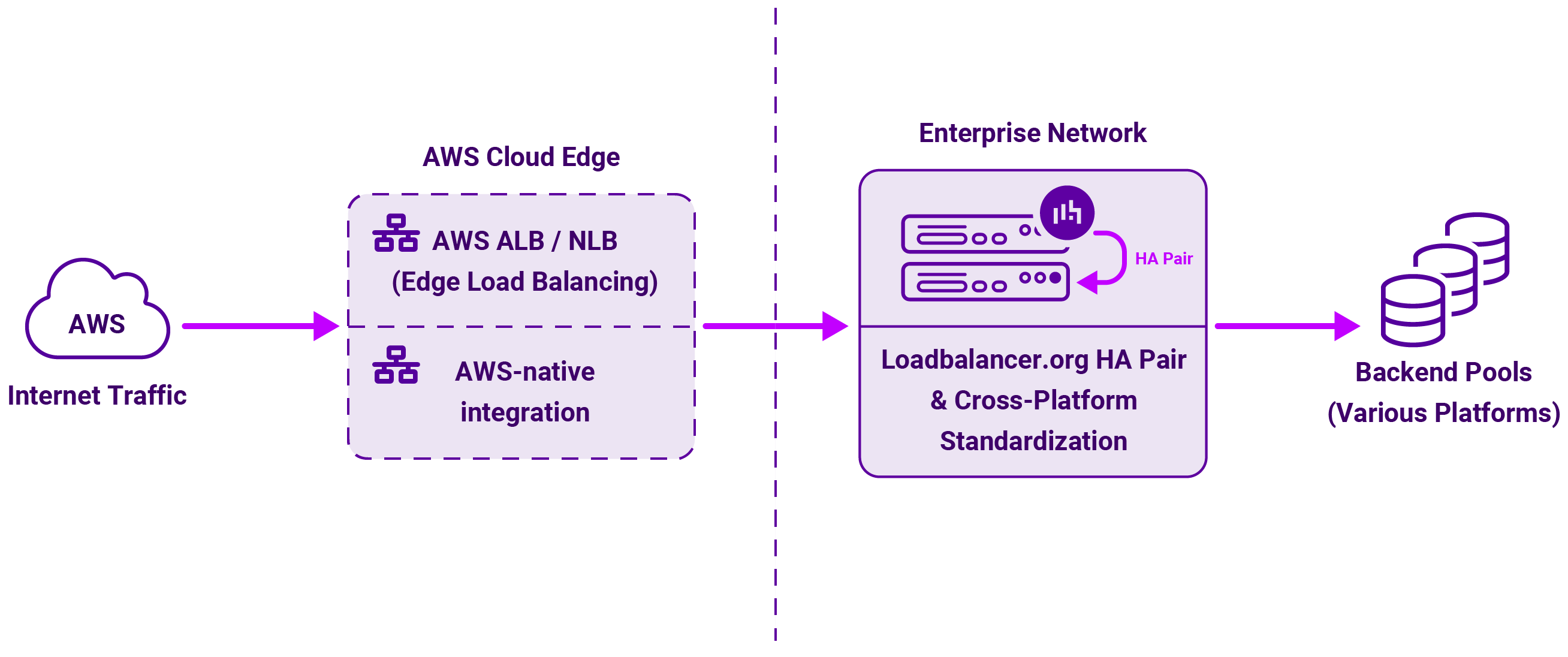
Loadbalancer’s Enterprise AWS ADC is cloud-agnostic load balancer, delivered as a virtual appliance on EC2 — usually deployed as an HA pair behind one or more AWS load balancers, or directly with Elastic IPs.
Key characteristics of the Enterprise AWS:
- Full ADC feature set: Advanced L4/L7 virtual services, SSL termination and re‑encryption, content switching, URL rewrites, cookie/persistence options, application‑aware health checks, and an integrated WAF.
- HA and failover: Active/standby pairs are available with state and config sync, typically fronted by an AWS NLB or ALB for IP stability and seamless failover.
- Portability and a Freedom License: The same product and interface can run on‑prem, in AWS, Azure, and other environments, allowing reuse of policies and configuration across estates.
Which one makes sense for your AWS environment?
Let's start with a feature comparison of the two AWS load balancing offerings described above (AWS ALB and NLB load balancers, and the third-party load balancer Loadbalancer.org).
| FEATURE | ALB | NLB | Loadbalancer.org in AWS |
|---|---|---|---|
| Balance load between targets | YES | YES | YES |
| Perform health checks on targets | YES | YES | YES |
| Highly available | YES | YES | YES |
| Round-robin | YES | YES | YES |
| Elastic | YES | YES | YES |
| TLS Termination | YES | YES | YES |
| Performance | GOOD | VERY HIGH | VERY GOOD |
| Send logs & metrics to CloudWatch | YES | YES | YES |
| Layer 4 (TCP) | NO | YES | YES |
| Layer 4 (UDP) [SNAT/NAT] | NO | YES | YES |
| Layer 7 (HTTP) | YES | NO | YES |
| Advanced routing options | YES | N/A | YES |
| Can send fixed response without backend | YES | NO | YES |
| Supports user authentication | YES | NO | YES |
| Can serve multiple domains over HTTPS | YES | YES | YES |
| Preserve Source IP | NO | YES | YES |
| Supports application-defined sticky session cookies | NO | N/A | YES |
| Supports targets outside AWS | YES | YES | YES |
| Supports WebSockets | YES | N/A | YES |
| Can route to many ports on a given target | YES | YES | YES |
| Availability Zones | YES | YES | YES |
Based on this, I'd personally recommend using an ALB or NLB AWS load balancer when:
- Workloads are cloud‑first web APIs or microservices on ECS/EKS/Lambda and fit neatly in ALB and NLB feature sets.
- Operational simplicity matters more than granular ADC features.
And instead use a Loadbalancer.org appliance in AWS when:
- You need consistent ADC behaviour across data centres and clouds (e.g. same persistence or health‑check semantics in multiple environments).
- You need richer ADC features, custom WAF policies, or GSLB patterns that exceed standard AWS capabilities.
Here's an example use case for a third-party load balancer in AWS:

Best cloud load balancer for Azure
What does the Azure native load‑balancing stack offer?
Azure’s load‑balancing portfolio is split by layer and scope:
- Azure Traffic Manager: Global DNS‑based load balancing service providing priority, performance and geographic routing across endpoints.
- Azure Standard Load Balancer: Regional Layer 4 (TCP/UDP) load balancer for internal and public traffic, with zone‑redundant frontends, health probes, and support for high‑availability (HA) ports to balance all ports with one rule.
- Azure Application Gateway (v2): Regional Layer 7 HTTP(S) reverse proxy and WAF, with path/host routing, autoscaling, zone‑redundancy and tight integration with AKS as an ingress controller.
- Azure Front Door: Global, edge‑based HTTP(S) front door combining anycast routing, TLS termination, optional CDN, and WAF, comparable to Front Door and global ALB in other clouds.
They also used to offer something called an Azure Basic Load Balancer, but this was retired in Sept 2025.
High Availability is built around Availability Zones and regional redundancy, while the Standard Load Balancer and Application Gateway v2 can be zone‑redundant inside a region, while Front Door and Traffic Manager handle multi‑region failover.
Azure Front Door WAF v Application Gateway's WAF
The most misunderstood security aspect of Azure's load balancing offering is the difference between their Global WAF (Front Door) and their Regional WAF (Application Gateway). In fact, in many enterprises, engineers use both.
- Azure Front Door WAF: The Front Door WAF blocks broad, high-volume attacks and bots at the global edge.
- Azure Application Gateway WAF: The Application Gateway WAF provides a second layer of security inside the region, closer to the actual code, to catch anything that might have slipped through or to protect internal-only services
In my experience, if you have a public website with users across the country or world, use the Front Door WAF. If you have a single-region app or need to keep traffic strictly private, then you need the Application Gateway WAF.
HA ports in Azure
The use of HA ports will let a single internal Standard Load Balancer rule handle all TCP/UDP traffic across all ports, using 5‑tuple hashing per flow.
I'd recommend considering HA ports in the following use cases:
- You have Network Virtual Appliances (NVAs) and third‑party ADCs that must see arbitrary east‑west flows without per‑port configuration.
- Complex multi‑port applications where dozens of rules would otherwise be required.
What does a third-party load balancer offer in Azure?
Let's take the same third-party load balancer we did before to keep the comparison like-for-like.
On Azure, Loadbalancer.org is delivered as a virtual appliance pair in a Virtual Network, relying explicitly on the Azure Load Balancer to manage failover.
This tag-team approach plays out in the following way:
- Azure Load Balancer frontends terminate the VIP and use health probes to direct traffic to the active Loadbalancer.org node. If the active node then fails, Azure will stop sending traffic to it and shift to the standby node.
- HA ports are commonly used in front of the appliance pair when the ADC is acting as a generic NVA handling many ports or protocols.
- The same ADC features and UI as in AWS and on‑prem are also available, enabling consistent behaviour and policies.
Which one makes sense for your Azure environment?
Let's compare the features of each load balancer in the same way we did for AWS:
| Feature | Azure Traffic Manager | Azure Standard Load Balancer | Azure Application Gateway | Azure Front Door | Loadbalancer.org in Azure |
|---|---|---|---|---|---|
| Core Logic | GSLB (DNS-based) | Layer 4 LB | Layer 7 Regional (TCP mode avail.) | Layer 7 Global | L4/L7 Versatile |
| HTTP & HTTPS | - | YES | YES | YES | YES |
| UDP & TCP | - | YES | YES | YES | YES |
| HTTP/2 | - | YES | YES | YES | YES |
| TCP | - | YES | YES | - | YES |
| UDP | - | YES | No | No | YES |
| Layer 4 | - | YES | YES | - | YES |
| Layer 7 | - | - | YES | YES | YES |
| Global Apps | YES | YES | YES | YES | YES |
| Availability Zones | - | Zone Redundant & Zonal | YES | - | YES |
| SSL/TLS Offloading | - | - | YES | YES | YES |
| WAF | - | - | YES | YES | - |
| HA Ports | - | Internal LB Only | - | - | YES |
| Multiple Front Ends | N/A | YES | YES | YES | YES |
| Inbound & Outbound | - | YES | YES | YES | YES |
| Secure by Default | - | Closed to Inbound (NSG) | YES | YES | - |
Given this, I'd favour using Azure native services when:
- You're building primarily on AKS or VMSS and want Application Gateway + Standard Load Balancer + Front Door to handle in‑region and global web traffic with minimal operational overhead.
- You want first‑class integration with Azure WAF, DDoS, Identity, and monitoring without managing appliance OS upgrades.
And opt for Loadbalancer.org in Azure when:
- You need to replicate an existing Loadbalancer.org or other ADC configuration from on‑prem or AWS, with identical failover and persistence behaviour.
- You want one ADC skillset and UI across multiple clouds and data centres, while still leveraging Azure Load Balancer and Front Door for zoning and global reach.
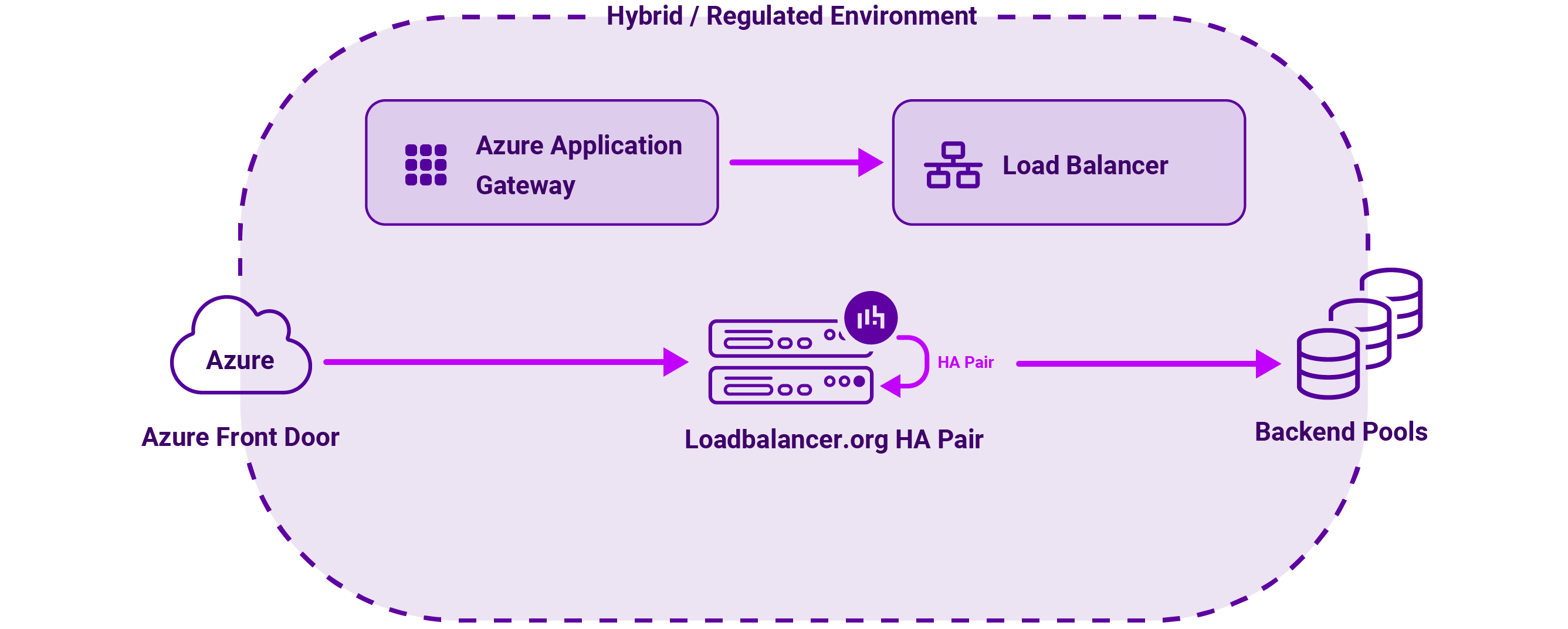
In practice, a common model is to have the Azure Front Door → Application Gateway or Azure Load Balancer → Loadbalancer.org HA pair → backend pools, especially in hybrid or regulated environments.

Best cloud load balancer for GCP
What does the GCP Cloud Load Balancing portfolio offer?
Google Cloud focuses heavily on global, software‑defined load balancing.
It's main services include:
- External Application Load Balancer: Global, anycast Layer 7 HTTP(S) load balancer with a single global IP, content‑based routing, Cloud CDN and Cloud Armor WAF.
- External Network Load Balancers / proxy: Regional L4/L7 options for TCP, UDP and SSL proxy traffic, suited to non‑HTTP and legacy protocols.
- Internal HTTP(S) Load Balancer: Regional L7 for service‑to‑service communication inside a VPC, ideal for internal APIs and microservices.
- Internal TCP/UDP Load Balancer: Regional L4 for east‑west traffic within a VPC, often fronting NVAs and internal services.
All Cloud Load Balancing services are fully managed and integrate with Managed Instance Groups (MIGs), enabling automatic scaling and zone‑redundant deployments within a region.
What does a third-party load balancer offer in GCP?
Currently, the Loadbalancer.org appliance on GCP runs as a single virtual ADC instance on Compute Engine with no supported HA clustering or active/standby model equivalent to AWS and Azure.
| FEATURE | GCP | Loadbalancer.org in GCP |
|---|---|---|
| HTTP & HTTPS | YES | YES |
| HTTP/2 | No? | YES |
| TCP | YES | YES |
| UDP | YES | YES |
| LAYER 4 | YES | YES (L4 single subnet, public facing) |
| LAYER 7 | YES | YES |
| CLOUD LOGGING | YES | YES |
| AVAILABILITY ZONES | NO | YES |
| SSL/TLS OFFLOADING | YES | YES |
| WEB APPLICATION FIREWALL | YES | YES |
| HA PORTS | NO | YES |
| MULTIPLE FRONT ENDS | YES | YES |
| SEAMLESS AUTOSCALING | YES | YES |
| AFFINITY | YES | YES |
| HIGH FIDELITY HEALTH CHECKS | YES | YES (health checks) |
Practical consequences:
- You can front the appliance with internal or external GCP load balancers, but these will only distribute traffic to that single appliance instance.
- Appliance failure results in downtime until the instance is restarted or rebuilt; there is no native, vendor‑supported HA pair with automatic failover at the ADC layer at the time of writing this.
Which one makes sense for your GCP environment?
This makes GCP’s own Cloud Load Balancing the primary option for production‑grade HA, with Loadbalancer.org currently best suited to PoCs, labs, or lower‑criticality roles where a single ADC instance is acceptable.

AWS, Azure vs GCP load balancer comparison
High-level AWS, Azure, and GCP comparison
Here's a high-level load balancing comparison of AWS, Azure, and GCP's load balancers:
| Feature | AWS (ELB) | Azure (Load Balancer/App Gateway) | GCP (Cloud Load Balancing) |
|---|---|---|---|
| Global Reach | Requires Global Accelerator | Front Door (Global L7) | Global Anycast IP by default |
| Best For | Deep AWS ecosystem integration | Hybrid Windows/Enterprise envs | Global traffic & massive scale |
| Complexity | Moderate (Multiple LB types) | Higher (Layered services) | Unified (Global Control Plane) |
You can see at a glance that their load balancing architectures prioritize completely different operational goals:
High-level AWS, Azure, and GCP comparison
- Global connectivity strategy: Google Cloud (GCP) is the most natively global, using a single anycast IP to route traffic across the world. In contrast, AWS and Azure are more regional by default; to achieve similar global reach, you must layer on additional services like AWS Global Accelerator or Azure Front Door.
- Ecosystem Specialization: The "Best For" row illustrates that the choice often depends on your existing stack rather than just the load balancer's features. AWS excels in deep, granular integration (like triggering Lambda functions), while Azure is the logical choice for enterprises deeply embedded in Active Directory or hybrid Windows environments.
- Management Overhead: GCP offers the most unified experience with a single control plane. Azure’s portfolio is more fragmented, requiring users to manage multiple distinct services (Standard LB, App Gateway, and Front Door) to cover all layers of the OSI model, which increases configuration complexity but offers specialized control at each tier.
AWS vs Azure vs GCP (L7 web capabilities)
Layer 7 (L7) web capabilities in the cloud refer to the Application Layer of the OSI model, where the infrastructure understands the actual content of the web traffic (HTTP/HTTPS). This allows for smart routing based on URLs, cookies, and headers, rather than just IP addresses.
The primary L7 services for the Big Three providers are:
- AWS: ALB is regional; for global anycast and CDN‑style behaviour you combine CloudFront and/or Global Accelerator.
- Azure: Application Gateway is regional; Front Door provides the global, edge‑based HTTP(S) tier.
- GCP: External Application Load Balancer is global by default with a single anycast IP, combining many features other clouds split across services.
AWS vs Azure vs GCP (L4 and NVA patterns)
Layer 4 (L4) capabilities focus on the Transport Layer (TCP/UDP). Unlike Layer 7, these services do not peek inside the data packets; they route traffic based purely on IP addresses and ports. This makes them significantly faster and capable of handling millions of requests per second with ultra-low latency.
NVA (Network Virtual Appliances) are third-party VMs (like Fortinet, Cisco, or Palo Alto firewalls) that you insert into your cloud network to perform specialized security or routing functions.
The primary L4 services for the Big Three providers are:
- AWS NLB/GWLB are strong fits for high‑performance TCP/UDP and appliance chaining.
- Azure Standard Load Balancer with HA ports is highly flexible for NVAs and multi‑port workloads.
- GCP Internal TCP/UDP Load Balancing plays the same NVA front‑end role but with a different implementation model.
Here's some differing opinions from real people on which of the Big Three load balancers is better:
- What are GCP feature advantages compared to AWS, Azure, other cloud providers?
- Honest question: why do people choose Google Cloud over AWS (or even Azure) when AWS still dominates almost every category?
- Google Cloud vs Azure vs AWS

Best cloud load balancer for multi-cloud
If you're looking for a multi-cloud load balancer then here's where a cloud-agnostic solution really comes into its own.
AWS, Azure and GCP load balancer multi-cloud considerations
Choosing between an AWS, Azure or GCP and cloud-agnostic load balancer for a multi-site deployment depends on whether your 'multi-site' strategy is multi-region (within one provider) or multi-cloud (across different providers).
For most users, cloud-native is better for single-provider multi-region setups, while cloud-agnostic load balancers, such as Loadbalancer.org, are essential for true multi-cloud or hybrid-cloud architectures.
Based on my experience, my suggestion would be to choose cloud-agnostic if...
- High Availability (HA) is the priority: You need your site to stay up even if an entire cloud provider (e.g., all of AWS) goes offline. An increasingly frequent occurrence these days.
- Hybrid cloud: You have some workloads in the cloud and some on-premise.
- Regulatory needs: You're required by law to avoid dependency on a single vendor.

Best cloud load balancer for security
There's no simple answer to this one. Neither approach is 'more secure' as such; instead, they offer different security advantages depending on your team's expertise and the complexity of your environment.
AWS, Azure and GCP load balancer security considerations
AWS, Azure and GCP load balancers come with default security settings. Great for those who just want to plug and play, but not so great for those who know what they're doing and want to customize or enhance their security setup.
In a nutshell:
- Integrated identity and access (IAM): You can control who can modify the load balancer using the same IAM roles you use for the rest of your infrastructure.
- Automated DDoS protection: Most native balancers include basic Layer 3 and 4 DDoS protection (like AWS Shield or Google Cloud Armor) as a built-in feature.
- One-click compliance: They often come with pre-configured WAF (Web Application Firewall) rule sets that satisfy compliance standards (PCI-DSS, SOC2) without manual tuning.
- Managed SSL/TLS: Certificate rotation is handled automatically by the provider (e.g., AWS Certificate Manager), reducing the risk of expired certificates causing downtime or security warnings.
Third-party, cloud-agnostic load balancer security considerations
Third-party, cloud-agnostic load balancers provide centralized security control. Great for those who want to maintain a consistent security posture across different environments.
For example:
- Policy parity: If you use multiple clouds (AWS + Azure), an agnostic balancer allows you to run the exact same WAF rules and security scripts everywhere. This prevents 'security drift' where one cloud is configured more strictly than another.
- Deep packet inspection: Agnostic tools often allow for more granular Layer 7 inspection and custom security logic that native balancers might not support.
- Zero-trust integration: They are often easier to integrate with third-party Zero-Trust Network Access (ZTNA) providers or external identity providers (like Okta or Ping Identity) across hybrid environments.
- Reduced blast radius: Because the balancer is independent of the cloud provider’s control plane, a massive outage or compromise of the provider’s management console is less likely to affect your traffic routing.
My advice?
Based on my experience, I'd recommend:
- Using cloud-native if you want to minimize the risk of human error (misconfigurations) and want the cloud provider to handle the 'heavy lifting' of security maintenance.
- Using cloud-agnostic if you are in a highly regulated industry (like Finance) and need a single, unified security wall that looks and acts the same regardless of which cloud provider is hosting the server. The Loadbalancer Enterprise appliance comes into its own here, offering the same interface across the 'Big Three'.

Best cloud load balancer for cost
There are two contrasting approaches to cloud traffic management that offer vastly different cost structures:
- Pay-as-you-go
- Bring Your Own License (BYOL)
The 'best price' depends on what you're measuring. Are you looking at the bottom line on your monthly invoice, or the hidden costs of engineering time and maintenance?
AWS, Azure and GCP load balancer cost considerations
Cloud-native balancers (AWS ALB, Google Cloud LB) use a pay-as-you-go model.
- Monthly billing: This provides a low barrier to entry, with costs scaling linearly with traffic. You pay for Load Balancer Units (LCUs/capacity units), which can become expensive at extreme scales.
- Operational savings: You save money on salaries. There are no servers to patch, no software to update, and no high-availability (HA) architecture to design. The cloud provider handles all undifferentiated heavy lifting.
- Vendor lock-in: One of the hidden costs is that if your provider raises prices or your architecture becomes inefficient on their platform, the cost to migrate to another cloud (refactoring) can reach hundreds of thousands of dollars.
- Break/fix support: Technical support is available, but even with the most comprehensive support package, you're still talking to a generalist who supports hundreds of different services (databases, AI, storage, etc.). So if you have a complex networking issue involving a specific legacy application protocol, they may struggle to provide deep architectural advice. If the load balancer service is 'up' but your traffic isn't flowing because of a complex routing rule you wrote, a hyperscaler support agent might simply point you to their documentation.
Third-party, cloud-agnostic load balancer cost considerations
Cloud-agnostic providers like Loadbalancer.org offer license-based or flat-rate pricing.
- BYOL: Cloud BYOLs allow you to deploy high-performance Enterprise ADC (Application Delivery Controller) software on major cloud platforms like AWS, Azure, and GCP using a license purchased directly from the third-party provider. Unlike pay-as-you-go models where the cloud provider bills you hourly for software, BYOL decouples the software license from the cloud infrastructure. This requires a higher upfront cost (licensing or setup time). However, once the software is running on a Virtual Machine, you can push massive amounts of traffic through it without the 'per-request' fees that cloud providers charge.
- Operational savings: With a user-friendly WebUI, extensive documentation, and industry-leading support mean you don't need to be a load-balancing expert to manage your appliance.
- Arbitrage savings: Because you aren't tied to one vendor, you can move your backend to whichever cloud is currently cheapest without changing your load balancing layer.
- Deep technical support: If you opt for a third-party cloud load balancing provider like Loadbalancer.org, you end up talking to an engineer who lives and breathes a single product. They often act as an extension of your engineering team, helping you solve the "how do I make this work?" rather than just "is the service broken?" They will hop on a call with you at the drop of a hat to help you debug your specific configuration.
My advice?
If you’re after something quick and cheap to start, a load balancer from AWS, Azure, or GCP is the way to go. But if you'd prefer clear, predictable pricing and a team of experts ready to support you, a third-party provider is likely a better fit.

Hang on, what about Cloudflare?
For those who've jumped straight to this section, you’re likely looking for the 'catch'. In other words, why would your team choose NOT to use Cloudflare?!
After all, everyone uses it, and it's cheap and amazing...
Why Cloudflare isn't a local/infrastructure replacement
While Cloudflare is a brilliant leader in global traffic management, it lacks the 'deep roots' required for complex infrastructure management:
- VPC visibility: Cloudflare sits outside your private network. It cannot see the CPU load of your individual EC2 instances or automatically scale your Kubernetes pods. A local load balancer (like AWS ELB) is infrastructure-aware and reacts to the real-time state of your backend.
- Middleman risk: Using Cloudflare adds another single point of failure. If Cloudflare has an outage (as they occasionally do), your site goes down even if your backend servers are healthy.
- Protocol depth: Cloudflare is optimized for web traffic (HTTP/HTTPS). While they offer services like Spectrum for TCP/UDP, it is often more expensive and less flexible than a native Network Load Balancer (NLB) when handling non-web protocols like database replication or proprietary IoT streams.
- Zero-knowledge limits: For high-compliance industries (like Finance or Healthcare), Cloudflare presents a challenge — to inspect and cache traffic, they usually must decrypt it at the edge. If your security policy requires end-to-end encryption where only your local infrastructure holds the keys, an edge proxy can be a compliance hurdle.
- Added latency for local traffic: If your users are physically close to your data center, routing them through a Cloudflare 'hop' can actually increase latency rather than reduce it.

Overall takeaways
Do you need a cloud-native or cloud-agnostic load balancer? Well, the chances are, you might need both!
As I’ve hopefully illustrated above, cloud-native and cloud-agnostic load balancers can be complementary, as well as oppositional to the cloud native stack.
The cloud hyperscalers (AWS, Azure, GCP)
The hyperscalers tend to be the ‘go-to’ load balancing solution for:
- Straightforward cloud-native workloads (especially those where IT teams want easy NoOps scaling and tight platform integration).
- Teams already locked into a specific cloud ecosystem who need deep integration.
AWS and Azure’s offerings are fully HA‑capable with appliance pairs integrated into each cloud’s own load‑balancing and zoning constructs.
However, bear in mind that in GCP there are currently HA limitations like zonal-only focus for some tech (Regional PDs), configuration inflexibility (HA VPN gateways are immutable), performance trade-offs (Regional PD write latency/throughput), potential for longer failover times (database recovery), and reliance on user-defined health checks for application-level HA.
Third-party, cloud-agnostic providers (the performance/arbitrage king)
Third-party, cloud-agnostic load balancers, such as Loadbalancer’s Enterprise product, in contrast, act as a strategic load balancing layer for the following workloads:
- Hybrid/multi-cloud estates needing uniform behaviour across environments.
- Use cases needing richer ADC features, WAF, GSLB, or very specific failover and persistence.
- Environments where a dedicated vendor relationship and support model are required.
- High-scale enterprises where LCU fees from cloud providers would reach millions of dollars. Here, you pay for the Virtual Machine, not per request.
Cloudflare (the edge leader)
Cloudflare is best for security-first organizations and those wanting to offload heavy traffic before it even hits their cloud.
The are lots of other third-party, cloud-agnostic load balancers too!
For comparison purposes and simplicity, I've used Loadbalancer.org for the cloud-native/cloud-agnostic comparisons above. But there are of course number of other third party load balancers available on the market, including F5 and Citrix NetScaler which I'd be remiss not to mention.
Ultimately, my main takeaway would be to let your architecture be the starting point to guide your research. But that conclusion's a bit boring, so let me know what you think in the comments below ; ).