








Load balancing HPE Morpheus Enterprise
Updated on October 13, 2026
•
Published on July 15, 2026
Benefits of load balancing HPE Morpheus Enterprise
When deploying HPE Morpheus in a multi-node, High Availability (HA) environment, utilizing a frontend load balancer to distribute traffic across the stateless application tier provides the following benefits:
- High Availability and failover: By using a load balancer to distribute user and API traffic across multiple application nodes, you eliminate single points of failure. If an underlying virtual machine, hardware host, or system service crashes, the load balancer automatically detects the failure and seamlessly reroutes traffic to the remaining healthy nodes. Your developers and operations teams retain continuous access to the hybrid cloud management platform without interruption.
- Zero-downtime and rolling upgrades: Maintaining and patching enterprise software usually requires scheduled downtime. By running a load-balanced Morpheus cluster, administrators can perform rolling upgrades. You can simply remove a single application node out of the load-balanced rotation, apply updates, verify its health, and bring it back online before moving to the next node. This ensures the orchestration engine remains online 24/7.
- Consistent performance and scalability: As your organization grows, thousands of daily API calls, webhook callbacks, and active user sessions (which rely heavily on WebSockets in Morpheus) can easily bottleneck a single appliance. A load balancer ensures that traffic is spread evenly. This guarantees a fluid, low-latency UI experience and consistent API responsiveness during periods of peak automation activity.
About HPE Morpheus Enterprise
HPE Morpheus Enterprise is a self-hosted hybrid cloud application orchestration and management platform. It provides unified self-service provisioning, automation, governance and operations across private and public clouds, virtual machines, containers and Kubernetes.
Users and administrators interact with the platform through a web-based UI and REST API, while the underlying container and Kubernetes services are delivered via an integrated Rancher-based services layer.
More on HPE’s acquisition of Morpheus.
Why Loadbalancer.org for HPE Morpheus?
Loadbalancer’s intuitive Enterprise Application Delivery Controller (ADC) is designed to save time and money with a clever, not complex, WebUI.
Easily configure, deploy, manage, and maintain our Enterprise load balancer, reducing complexity and the risk of human error. For a difference you can see in just minutes.
And with WAF and GSLB included straight out-of-the-box, there are no hidden costs, so the prices you see on our website are fully transparent.
More on what’s possible with Loadbalancer.org.
How to load balance HPE Morpheus Enterprise
The load balancer can be deployed in four fundamental ways: Layer 4 DR mode, Layer 4 NAT mode, Layer 4 SNAT mode, and Layer 7 Reverse Proxy (Layer 7 SNAT mode).
For HPE Morpheus Enterprise, Layer 7 Reverse Proxy is recommended.
Virtual service (VIP) requirements
To provide load balancing and High Availability for HPE Morpheus Enterprise, the following VIP is required:
| Ref. | VIP Name | Mode | Port(s) | Persistence Mode | Health Check |
|---|---|---|---|---|---|
| VIP 1 | Morpheus_VIP | Layer 7 Reverse Proxy (HTTP) | 443 | HTTP Cookie | HTTPS (GET) |
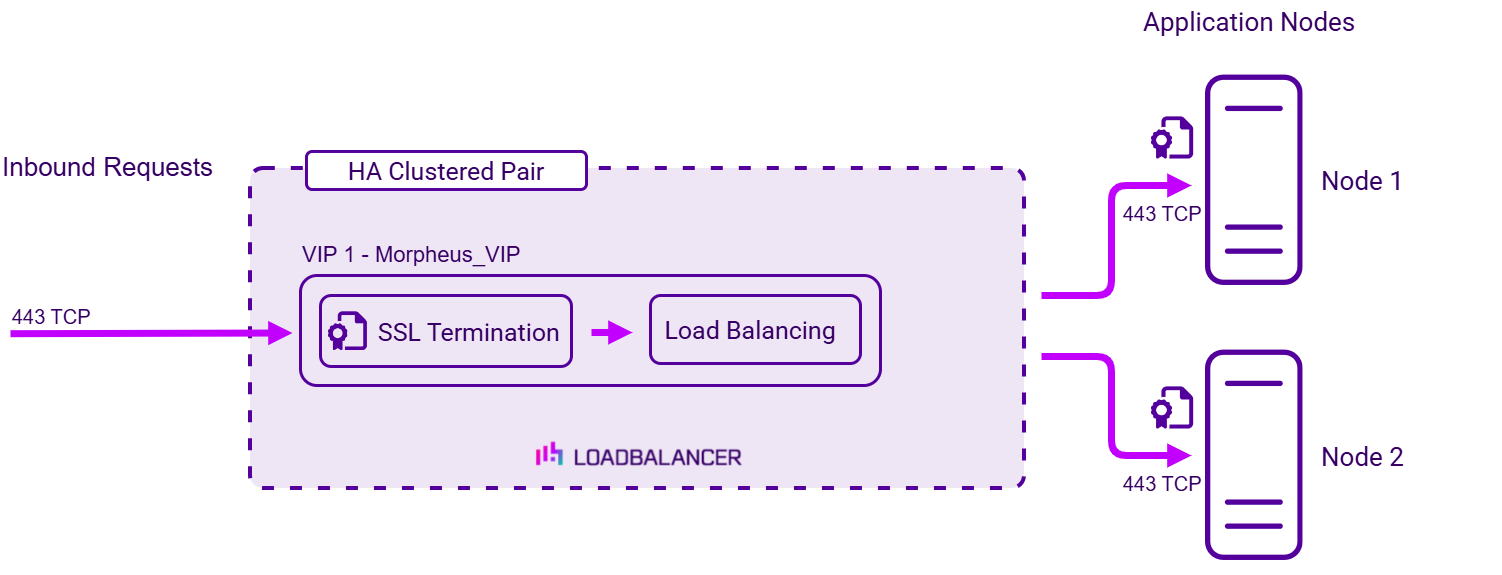
Load balancing deployment concept
Once the load balancer is deployed, clients connect to the Virtual Service (VIP) rather than connecting directly to
one of the HPE Morpheus Enterprise nodes. These connections are then load balanced across the HPE Morpheus
Enterprise nodes to distribute the load according to the load balancing algorithm selected:
About Layer 7 Reverse Proxy load balancing
Layer 7 Reverse Proxy uses a proxy (HAProxy) at the application layer. Inbound requests are terminated on the load balancer and HAProxy generates a new corresponding request to the chosen Real Server. As a result, Layer 7 is typically not as fast as the Layer 4 methods. Layer 7 is typically chosen when either enhanced options such as SSL termination, cookie based persistence, URL rewriting, header insertion/deletion etc. are required, or when the network topology prohibits the use of the Layer 4 methods.
The image below shows an example Layer 7 Reverse Proxy network diagram:
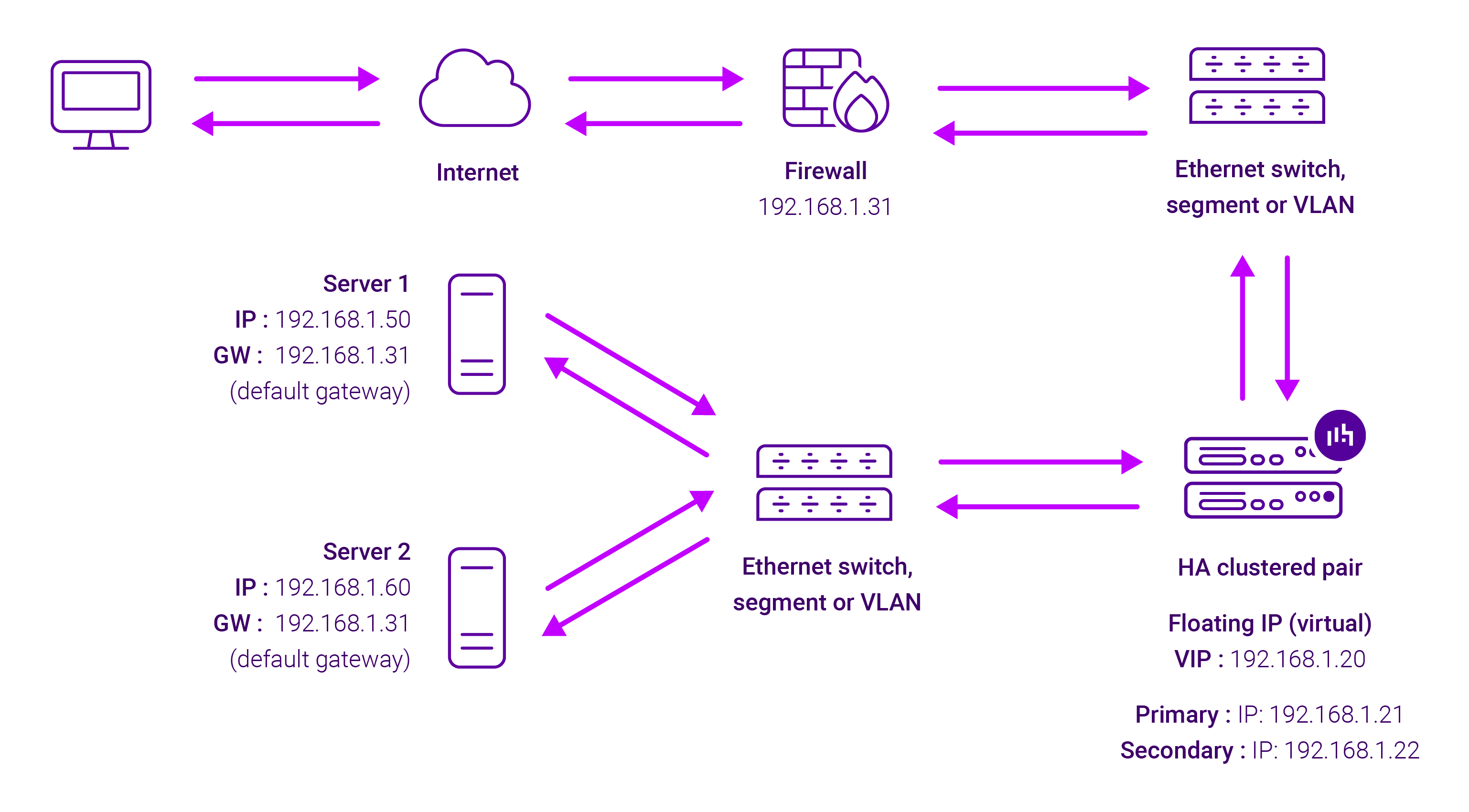
Because Layer 7 Reverse Proxy is a full proxy, Real Servers in the cluster can be on any accessible network including across the Internet or WAN.
Layer 7 Reverse Proxy is not transparent by default, i.e. the Real Servers will not see the source IP address of the client, they will see the load balancer’s own IP address by default, or any other local appliance IP address if preferred (e.g. the VIP address).
This can be configured per Layer 7 VIP. If required, the load balancer can be configured to provide the actual client IP address to the Real Servers in 2 ways. Either by inserting a header that contains the client’s source IP address, or by modifying the Source Address field of the IP packets and replacing the IP address of the load balancer with the IP address of the client. For more information on these methods, please refer to Transparency at Layer 7 in the Enterprise Admin Manual.