
Benefits of load balancing Denodo Design Studio
Because Denodo acts as the central gateway connecting your entire company’s data sources, it can easily become a major bottleneck or a single point of failure if it gets overwhelmed.
Deploying Denodo servers in a cluster behind a load balancer distributes incoming query traffic across multiple nodes, offering three major benefits:
- High Availability and seamless fault tolerance: If you rely on a single Denodo server and it goes down due to a hardware failure or a software crash, every connected dashboard, AI app, and BI tool instantly loses access to their data. A load balancer continuously runs active health checks on each Denodo node. If a node stops responding or fails a health check, the load balancer automatically routes traffic away from the broken server to healthy ones. To your end users and applications, the data layer stays completely online without a second of downtime.
- Maximum query performance and speed: Denodo handles heavy computational lifting — like parsing complex SQL queries, combining disparate datasets on the fly, and utilizing its caching engine. If dozens of data analysts run massive queries at the exact same time on one server, CPU and memory usage will spike, causing lag for everyone. The load balancer acts as a traffic controller, spreading incoming requests evenly across the server cluster. No single Denodo node gets overwhelmed, which minimizes latency and ensures quick query response times for all users.
- Frictionless horizontal scalability: As a company grows, so does its data consumption. Eventually, your initial Denodo infrastructure won’t have enough processing power to handle the increased user demand. With a load balancer in place, you achieve horizontal scaling — meaning you can add new Denodo servers to the cluster behind the scenes whenever traffic demands it. Denodo’s modern tools can even automate this using cloud auto-scaling. The load balancer instantly begins routing traffic to the new servers without requiring you to change a single configuration or IP address on the client side (like your Tableau, PowerBI, or python apps).
About Denodo
Denodo is primarily used by large organizations to rapidly integrate, manage, and deliver data scattered across diverse systems without the time and cost of physically moving it. By creating a unified virtual data layer, it allows companies to instantly connect cloud storage, traditional databases, and excel files so data analysts can query real-time information on the fly. It is most commonly deployed to power live business intelligence dashboards, accelerate data science and AI workflows, and centralize data security and governance across an entire enterprise.
The platform is used by data architects, engineers, and IT teams who need to build and secure a modern data infrastructure without creating messy, duplicated data pipelines. On the consuming side, it is heavily relied upon by business analysts, data scientists, and executives who need immediate, self-service access to accurate, up-to-the-minute corporate data for decision-making. Companies in data-heavy industries—such as banking, healthcare, logistics, and retail—frequently use Denodo to handle their massive and highly fragmented data environments.
Why Loadbalancer.org for Denodo?
Loadbalancer’s intuitive Enterprise Application Delivery Controller (ADC) is designed to save time and money with a clever, not complex, WebUI.
Easily configure, deploy, manage, and maintain our Enterprise load balancer, reducing complexity and the risk of human error. For a difference you can see in just minutes.
And with WAF and GSLB included straight out-of-the-box, there’s no hidden costs, so the prices you see on our website are fully transparent.
More on what’s possible with Loadbalancer.org.
How to load balance Denodo Design Studio
The load balancer can be deployed in four fundamental ways: Layer 4 DR mode, Layer 4 NAT mode, Layer 4 SNAT mode, and Layer 7 Reverse Proxy (Layer 7 SNAT mode).
For Denodo Design Studio, Layer 7 Reverse Proxy is recommended.
Virtual service requirements
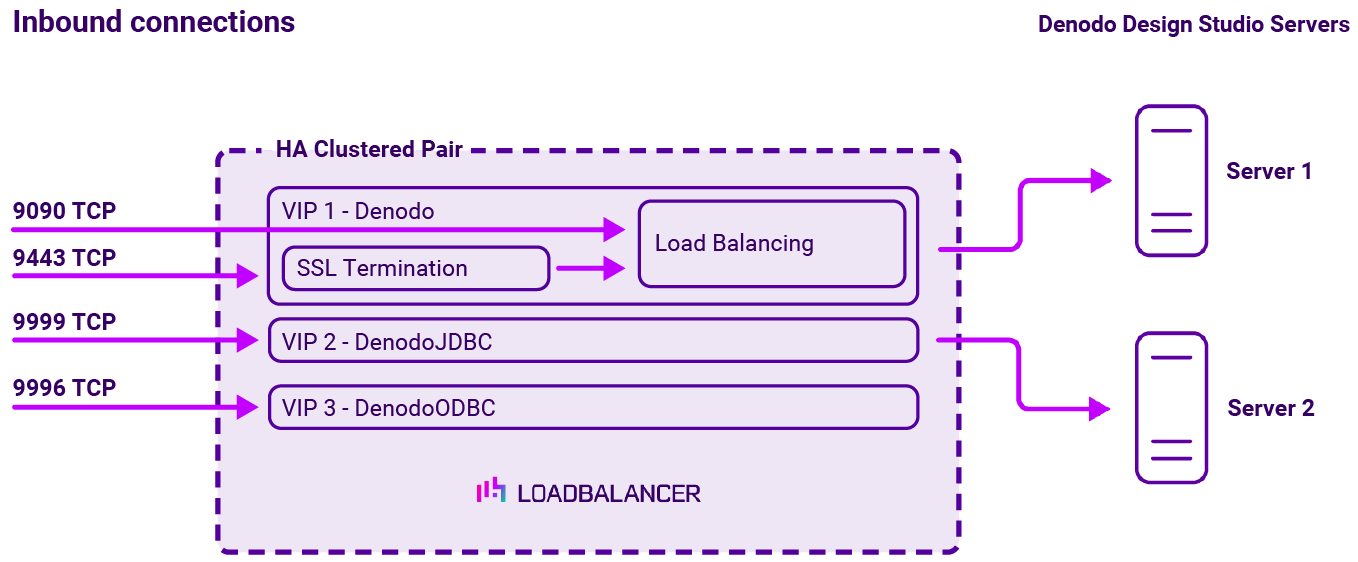
To provide load balancing and HA for Denodo Design Studio, the following VIPs are required:
| Ref | VIP Name | Mode | Port(s) | Persistence Mode | Health Check |
|---|---|---|---|---|---|
| VIP 1 | Denodo | Layer 7 Reverse Proxy (HTTP) | 9090 | HTTP Cookie | HTTPS (GET) |
| VIP 2 | DenodoJDBC | Layer 7 Reverse Proxy (TCP) | 9999 | Source IP | Connect to Port |
| VIP 3 | DenodoODBC | Layer 7 Reverse Proxy (TCP) | 9996 | Source IP | Connect to Port |
Load balancing deployment concept
Once the load balancer is deployed, clients connect to the Virtual Services (VIPs) rather than connecting directly to one of the Denodo Design Studio servers. These connections are then load balanced across the Denodo Design Studio servers to distribute the load according to the load balancing algorithm selected.
About Layer 7 Reverse Proxy load balancing
Layer 7 Reverse Proxy uses a proxy (HAProxy) at the application layer. Inbound requests are terminated on the load balancer and HAProxy generates a new corresponding request to the chosen Real Server. As a result, Layer 7 is typically not as fast as the Layer 4 methods.
Layer 7 is typically chosen when enhanced options such as SSL termination, cookie based persistence, URL rewriting, header insertion/deletion etc. are required, or when the network topology prohibits the use of the Layer 4 methods.
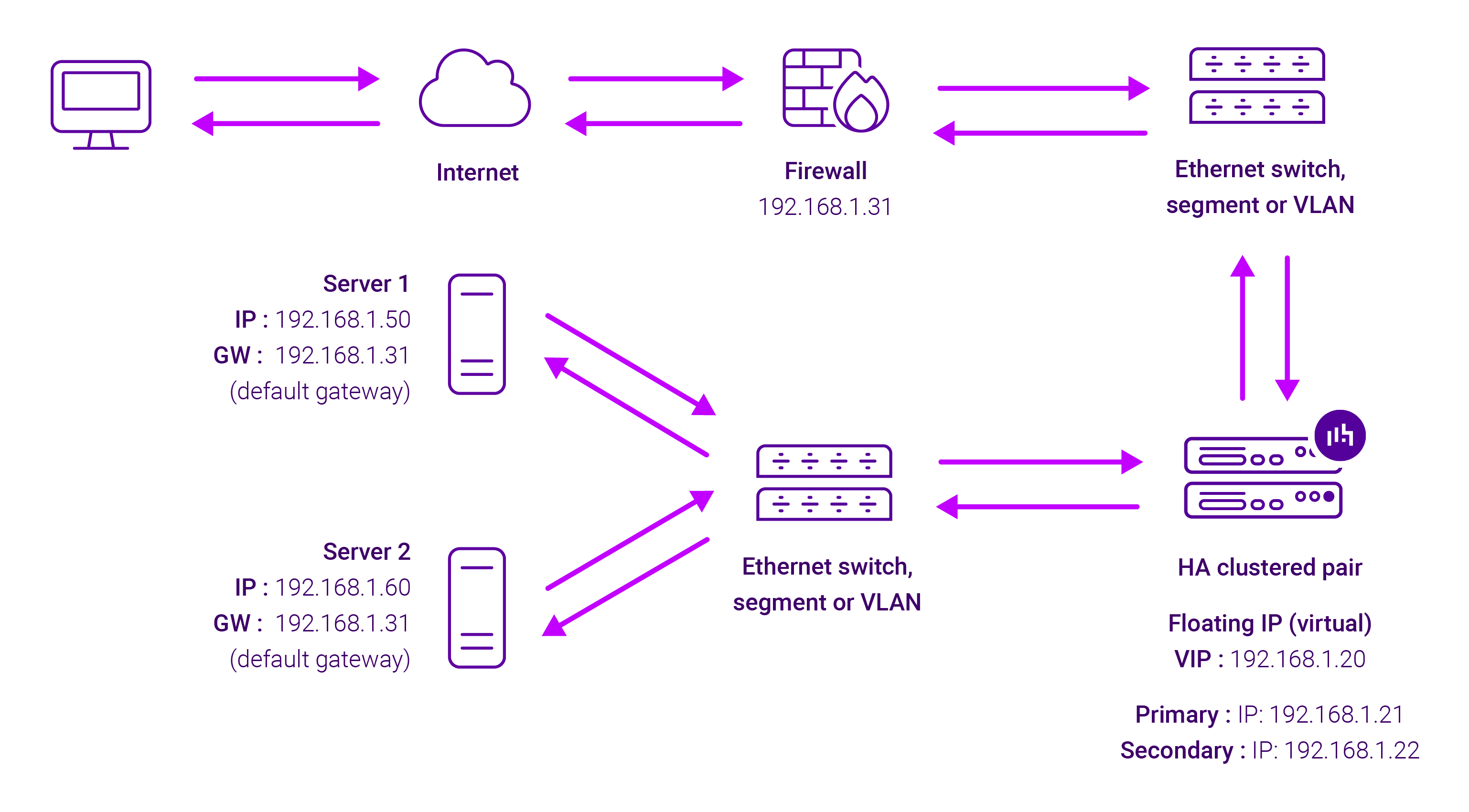
Because Layer 7 Reverse Proxy is a full proxy, any server in the cluster can be on any accessible subnet, including across the Internet or WAN.
Layer 7 Reverse Proxy is not transparent by default i.e. the Real Servers will not see the source IP address of the client, they will see the load balancer’s own IP address by default, or any other local appliance IP address if preferred (e.g. the VIP address). This can be configured per Layer 7 VIP.
If required, the load balancer can be configured to provide the actual client IP address to the Real Servers in two ways:
- Either by inserting a header that contains the client’s source IP address, or
- By modifying the Source Address field of the IP packets and replacing the IP address of the load balancer with the IP address of the client.
Layer 7 Reverse Proxy mode can be deployed using either a one-arm or two-arm configuration. For two-arm deployments, eth0 is normally used for the internal network and eth1 is used for the external network, although this is not mandatory.
No mode-specific configuration changes to the load balanced Real Servers are required.
Port translation is possible with Layer 7 Reverse Proxy e.g. VIP:80 → RIP:8080 is supported. You should not use the same RIP:PORT combination for Layer 7 Reverse Proxy VIPs and Layer 4 SNAT mode VIPs because the required firewall rules conflict.