








Benefits of load balancing CyberArk PSM
Load balancing CyberArk Privileged Session Manager (PSM) servers is an architecture best practice for any enterprise-grade deployment for these reasons:
- High Availability and fault tolerance: By grouping multiple PSM instances behind a single Virtual IP (VIP), you eliminate a single point of failure (SPOF) for privileged access. If a backend PSM server fails or needs to be taken offline for routine patching, the load balancer automatically detects the outage. It immediately reroutes incoming RDP and SSH traffic to healthy nodes, ensuring that administrators and third-party vendors never experience an interruption in access to critical target systems.
- Enhanced performance: Privileged sessions are highly resource-intensive. Running session recordings, keystroke logging, and video rendering simultaneously demands significant CPU, memory, and bandwidth. A load balancer utilizes intelligent routing algorithms—such as Least Connections—to dynamically distribute the connection load so no single PSM instance becomes a bottleneck. As your organization grows and concurrent session counts rise, you can seamlessly scale your environment horizontally by adding more PSM servers to the pool without modifying any target machine configurations.
- Seamless user experience: A load balancer allows you to define a single logical PSM Server FQDN/VIP inside the Privileged Vault Web Access (PVWA) system configuration. All target platforms point to this single endpoint. This keeps the backend infrastructure completely transparent to end-users, who get a unified login experience, while providing PAM administrators the flexibility to rotate, upgrade, or add infrastructure on the fly.
About CyberArk PSM
CyberArk Privileged Session Manager (PSM) (now Idira) enables organizations to secure, control and monitor privileged access to network devices by using the Vault technology to manage privileged accounts and record all IT administrator privileged sessions on remote machines.
PSM acts as an additional authentication layer and proxy for RDP connections. It also includes an HTML5 gateway, which allows users to establish RDP sessions directly from a web browser.
Why Loadbalancer.org for CyberArk?
Loadbalancer’s intuitive Enterprise Application Delivery Controller (ADC) is designed to save time and money with a clever, not complex, WebUI.
Easily configure, deploy, manage, and maintain our Enterprise load balancer, reducing complexity and the risk of human error. For a difference you can see in just minutes.
And with WAF and GSLB included straight out-of-the-box, there are no hidden costs, so the prices you see on our website are fully transparent.
More on what’s possible with Loadbalancer.org.
How to load balance CyberArk PSM
The load balancer can be deployed in four fundamental ways: Layer 4 DR mode, Layer 4 NAT mode, Layer 4 SNAT mode, and Layer 7 Reverse Proxy (Layer 7 SNAT mode).
For CyberArk, Layer 7 Reverse Proxy is recommended.
Virtual service (VIP) requirements
To provide load balancing and HA for Oracle Application / HTTP Server, the following VIP is required:
| Ref. | VIP Name | Mode | Port(s) | Persistence Mode | Health Check |
|---|---|---|---|---|---|
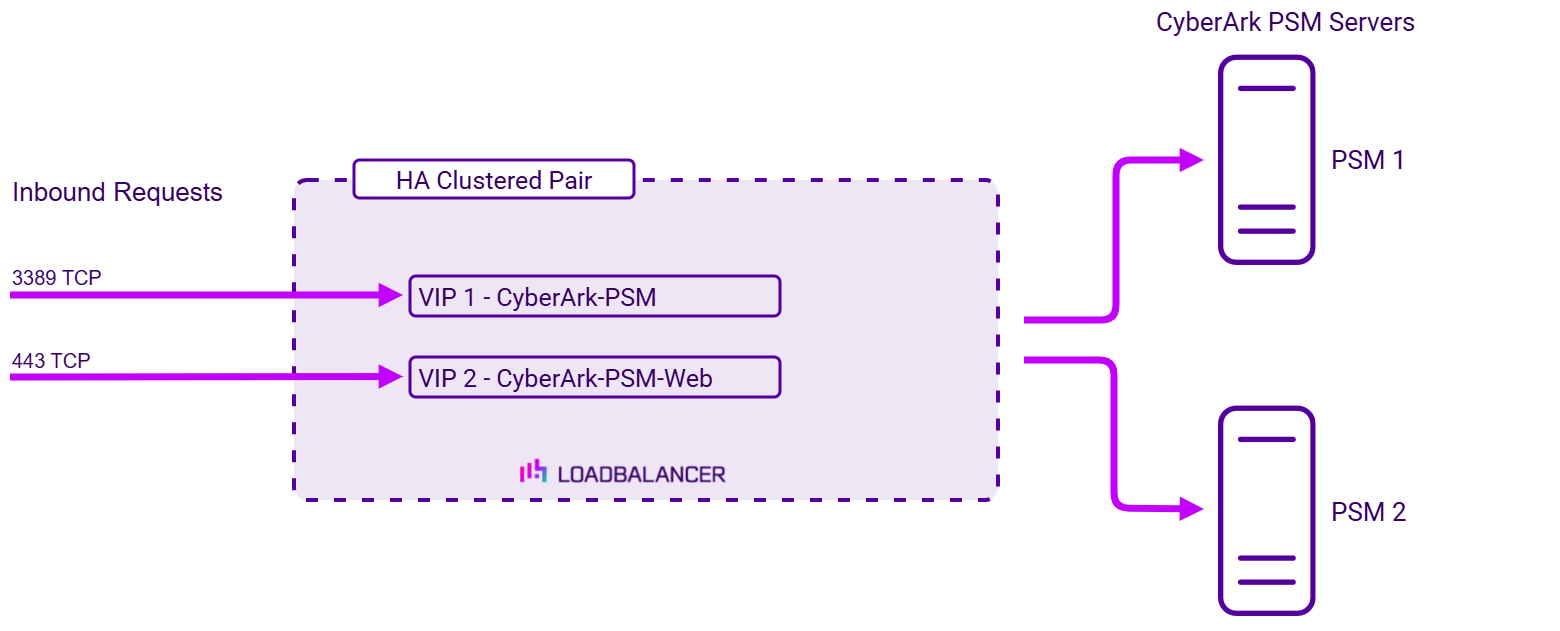
| VIP 1 | CyberArk-PSM | Layer 7 Reverse Proxy (TCP) | 3389 | Source IP | HTTPS (GET) |
| VIP 2 | CyberArk-PSM-Web | Layer 7 Reverse Proxy (TCP) | 443 | Source IP | HTTPS (GET) |
Load balancing deployment concept
Once the load balancer is deployed, clients connect to the Virtual Services (VIPs) rather than connecting directly to one of the CyberArk PSM servers. These connections are then load balanced across the CyberArk PSM servers to distribute the load according to the load balancing algorithm selected:
About Layer 7 Reverse Proxy load balancing
Layer 7 Reverse Proxy uses a proxy (HAProxy) at the application layer. Inbound requests are terminated on the load balancer and HAProxy generates a new corresponding request to the chosen Real Server. As a result, Layer 7 is typically not as fast as the Layer 4 methods. Layer 7 is typically chosen when either enhanced options such as SSL termination, cookie based persistence, URL rewriting, header insertion/deletion etc. are required, or when the network topology prohibits the use of the Layer 4 methods. The image below shows an example network diagram for this mode.
The image below shows an example Layer 7 Reverse Proxy network diagram:
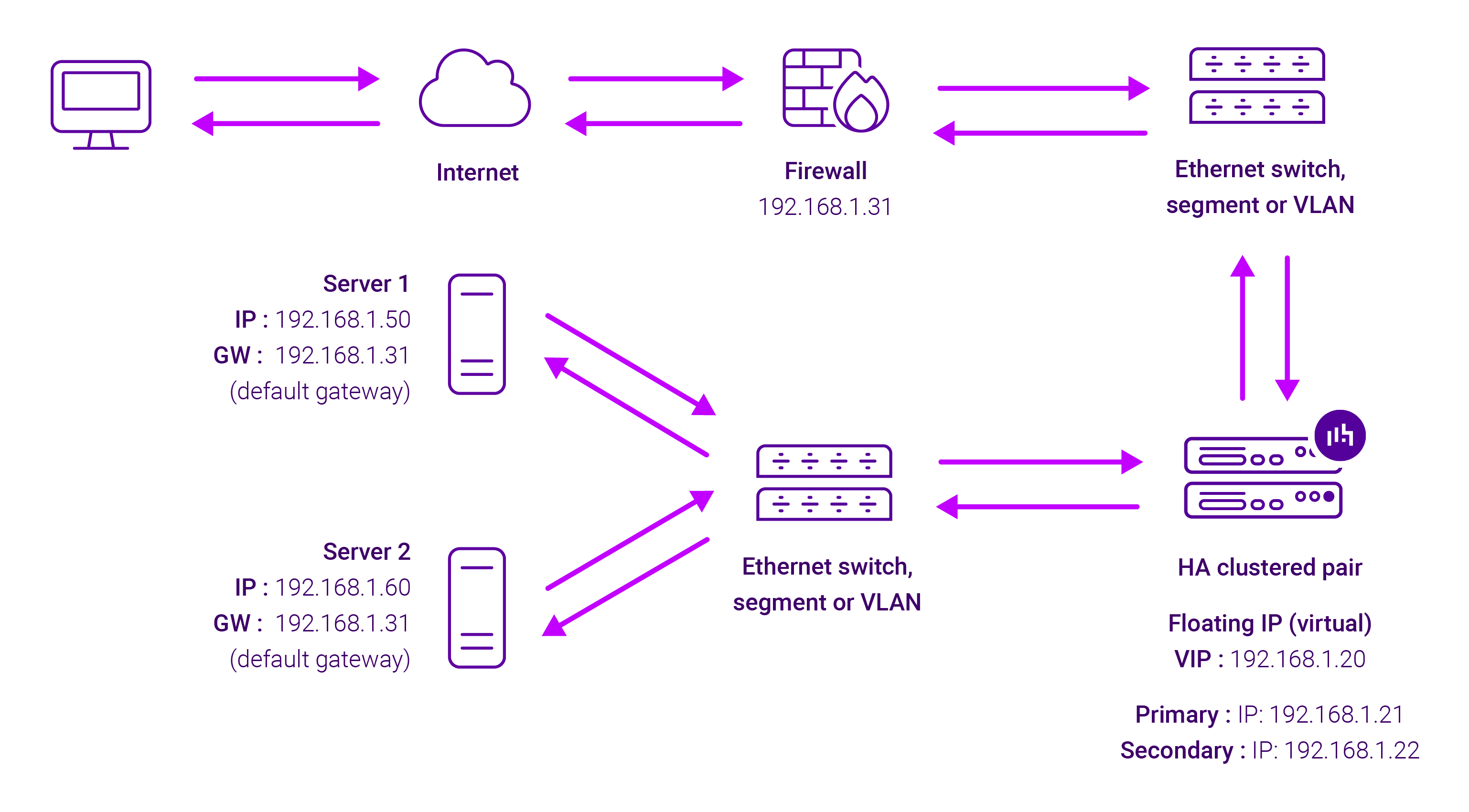
Because Layer 7 Reverse Proxy is a full proxy, Real Servers in the cluster can be on any accessible network including across the Internet or WAN.
Layer 7 Reverse Proxy is not transparent by default, i.e. the Real Servers will not see the source IP address of the client, they will see the load balancer’s own IP address by default, or any other local appliance IP address if preferred (e.g. the VIP address). This can be configured per Layer 7 VIP. If required, the load balancer can be configured to provide the actual client IP address to the Real Servers in 2 ways. Either by inserting a header that contains the client’s source IP address, or by modifying the Source Address field of the IP packets and replacing the IP address of the load balancer with the IP address of the client. For more information on these methods please refer to Transparency at Layer 7.
Requires no mode-specific configuration changes to the load balanced Real Servers.
Port translation is possible with Layer 7 Reverse Proxy, e.g. VIP:80 → RIP:8080 is supported.
You should not use the same RIP:PORT combination for Layer 7 Reverse Proxy VIPs and Layer 4 SNAT mode VIPs because the required firewall rules conflict.