Load balancing Cisco Duo Network Gateway
Updated on June 4, 2026
•
Published on May 12, 2026
Benefits of load balancing Cisco Duo Network Gateway (DNG)
Load balancing the Cisco Duo Network Gateway (DNG) is critical for enterprise environments. Because the DNG acts as a primary entry point for your internal web applications and SSH/RDP relays, a single instance can become a bottleneck or a single point of failure.
By placing multiple DNG instances behind a load balancer, you achieve the following benefits:
- High Availability (HA): The main benefit is the elimination of a single point of failure. If a standalone Duo Network Gateway goes offline due to a hardware failure, software crash, or power outage, all remote access to your internal applications is severed. Instead, when load balanced, the health check mechanism of the load balancer identifies a down DNG instance and immediately reroutes traffic to the healthy nodes. This is seamless process happens automatically at the network layer, without any disruption to the end user.
- Performance: As your workforce grows, the volume of simultaneous MFA requests and data throughput for SSH/RDP sessions increases. A load balancer distributes incoming connections across several DNG instances, preventing any single gateway from hitting CPU or memory limits.
- Horizontal scalability: You can spin up additional DNG instances during peak times (like a sudden shift to remote work) and add them to the load balancer pool without having to reconfigure your DNS or security policies.
About Cisco Duo Network Gateway
Cisco Duo Network Gateway (DNG) is a specialized tool that allows your employees to access internal web applications and SSH servers from any device, without needing a traditional VPN.
It acts as a reverse proxy that sits between the public internet and your private network.
Why Loadbalancer.org for Cisco Duo Network Gateway?
Loadbalancer’s intuitive Enterprise Application Delivery Controller (ADC) is designed to save time and money with a clever, not complex, WebUI.
Easily configure, deploy, manage, and maintain our Enterprise load balancer, reducing complexity and the risk of human error. For a difference you can see in just minutes.
And with WAF and GSLB included straight out-of-the-box, there’s no hidden costs, so the prices you see on our website are fully transparent.
More on what’s possible with Loadbalancer.org.
How to load balance Cisco Duo Network Gateway
The load balancer can be deployed in 4 fundamental ways: Layer 4 DR mode, Layer 4 NAT mode, Layer 4 SNAT mode, and Layer 7 Reverse Proxy (Layer 7 SNAT mode).
For Cisco Duo Network Gateway, Layer 7 Reverse Proxy mode is recommended.
Virtual service (VIP) requirements
To provide load balancing and HA for Cisco Duo Network Gateway, the following VIPs are required:
| Ref | VIP Name | Mode | Port(s) | Persistence Mode | Health Check |
|---|---|---|---|---|---|
| VIP 1 | DuoNetworkGateway | Layer 7 Reverse Proxy | 80, 443 | Source IP | HTTPS (GET) |
Load balancing deployment concept
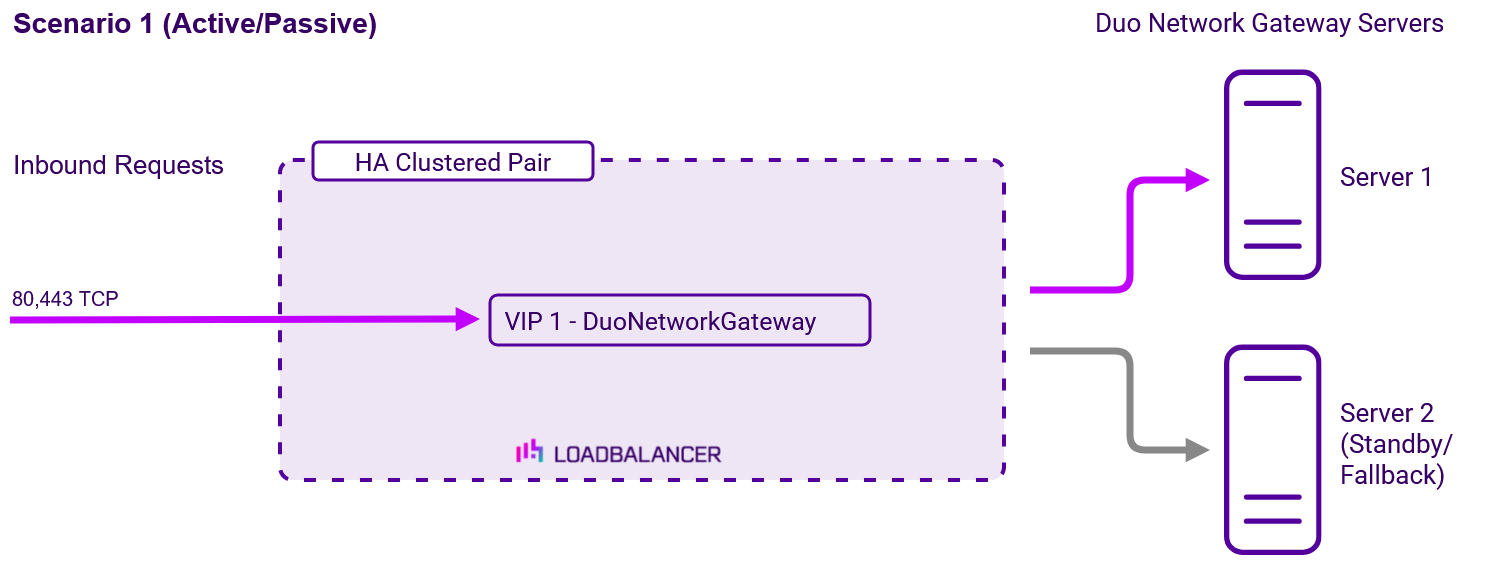
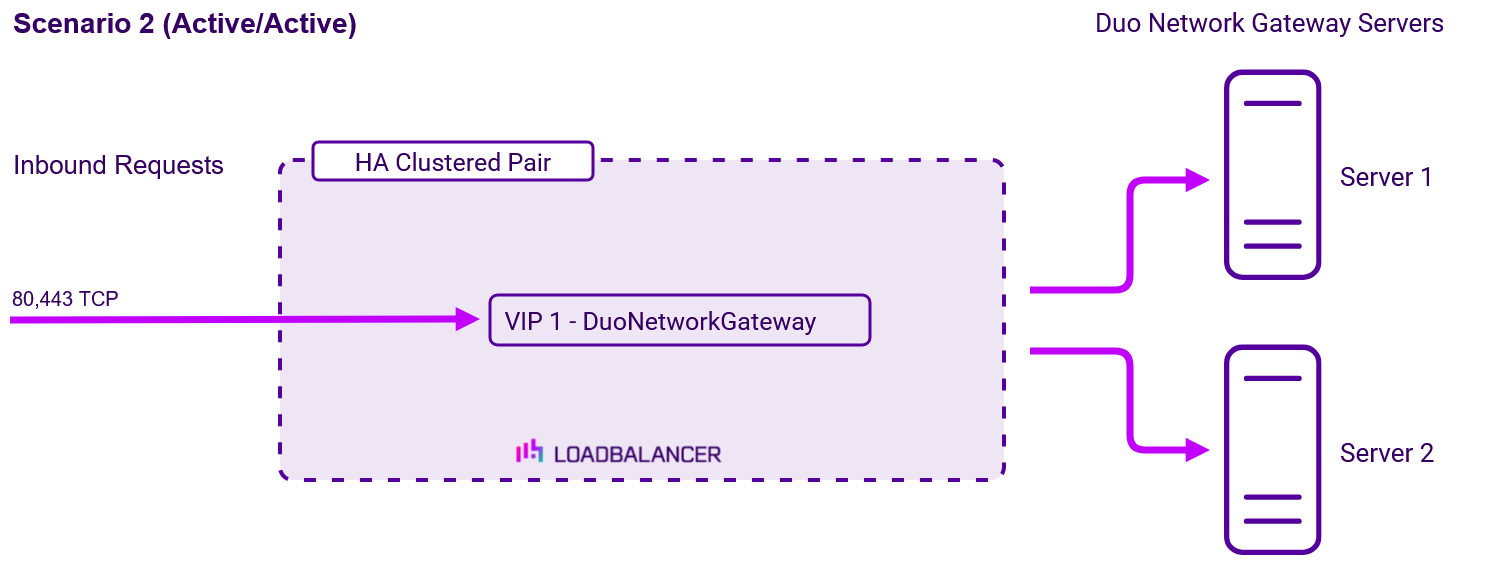
Once the load balancer is deployed, clients connect to the Virtual Service (VIP) rather than connecting directly to
one of the Duo Network Gateway servers.
About Layer 7 Reverse Proxy load balancing
Layer 7 Reverse Proxy uses a proxy (HAProxy) at the application layer. Inbound requests are terminated on the load balancer and HAProxy generates a new corresponding request to the chosen Real Server. As a result, Layer 7 is typically not as fast as the Layer 4 methods. Layer 7 is typically chosen when either enhanced options such as SSL termination, cookie based persistence, URL rewriting, header insertion/deletion etc. are required, or when the network topology prohibits the use of the Layer 4 methods. The image below shows an example network diagram for this mode.
The image below shows an example Layer 7 Reverse Proxy network diagram:
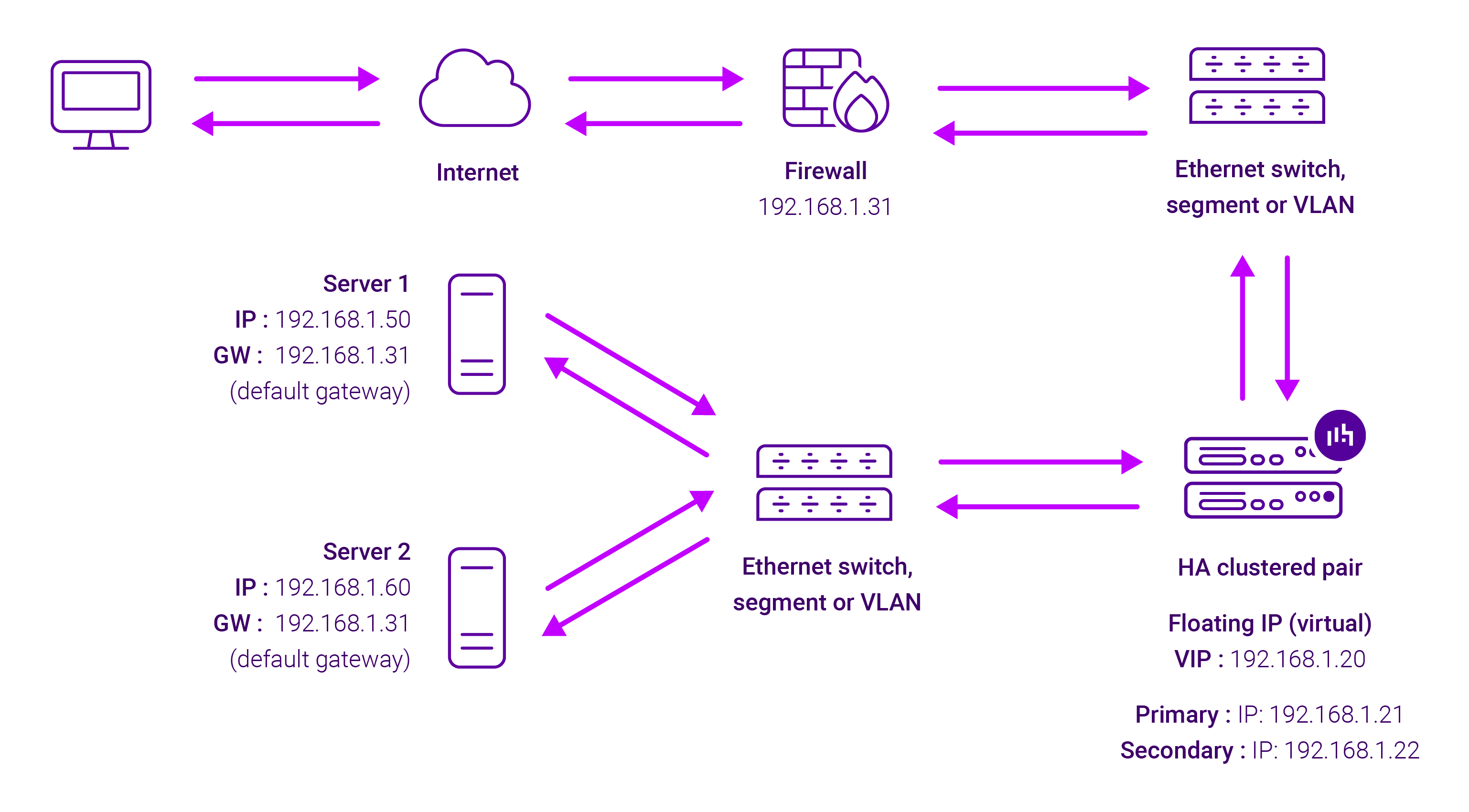
Because Layer 7 Reverse Proxy is a full proxy, Real Servers in the cluster can be on any accessible network including across the Internet or WAN.
Layer 7 Reverse Proxy is not transparent by default, i.e. the Real Servers will not see the source IP address of the client, they will see the load balancer’s own IP address by default, or any other local appliance IP address if preferred (e.g. the VIP address).
This can be configured per Layer 7 VIP. If required, the load balancer can be configured to provide the actual client IP address to the Real Servers in 2 ways. Either by inserting a header that contains the client’s source IP address, or by modifying the Source Address field of the IP packets and replacing the IP address of the load balancer with the IP address of the client. For more information on these methods, please refer to Transparency at Layer 7 in the Enterprise Admin Manual.