Benefits of load balancing VMWare App Volumes
Here are a few key benefits to load balancing VMware App Volumes:
- Allows individual servers to be isolated, reducing risk when performing inevitable upgrades and maintenance tasks – without interrupting end-users
- Ensures that the application is always available
- Provides stable and optimal performance
About VMware App Volumes
VMware App Volumes is a real-time application delivery system that helps businesses dynamically deliver and manage their applications.
Applications are packaged and delivered by attaching a standard VMDK or VHD file to a virtual machine. It enables you to centrally manage applications with the App Volumes Manager which is a Web-based interface integrated with Active Directory (AD) and vSphere. Administrators can assign, update, or remove applications to be delivered at the next user login without the need to modify the desktops or disrupt users while they are working. Writable Volumes allow users to access their application data across sessions and devices.
Why Loadbalancer.org for VMware App Volumes?
Loadbalancer’s intuitive Enterprise Application Delivery Controller (ADC) is designed to save time and money with a clever, not complex, WebUI.
Easily configure, deploy, manage, and maintain our Enterprise load balancer, reducing complexity and the risk of human error. For a difference you can see in just minutes.
And with WAF and GSLB included straight out-of-the-box, there’s no hidden costs, so the prices you see on our website are fully transparent.
More on what’s possible with Loadbalancer.org.
How to load balance VMware App Volumes
The load balancer can be deployed in 4 fundamental ways: Layer 4 DR mode, Layer 4 NAT mode, Layer 4 SNAT mode, and Layer 7 Reverse Proxy (Layer 7 SNAT mode).
For VMware App Volumes, Layer 7 Reverse Proxy is recommended.
Virtual service (VIP) requirements
To provide load balancing and HA for VMWare App Volumes, a single VIP is required:
- VMWare App Volumes
Load balancing deployment concept
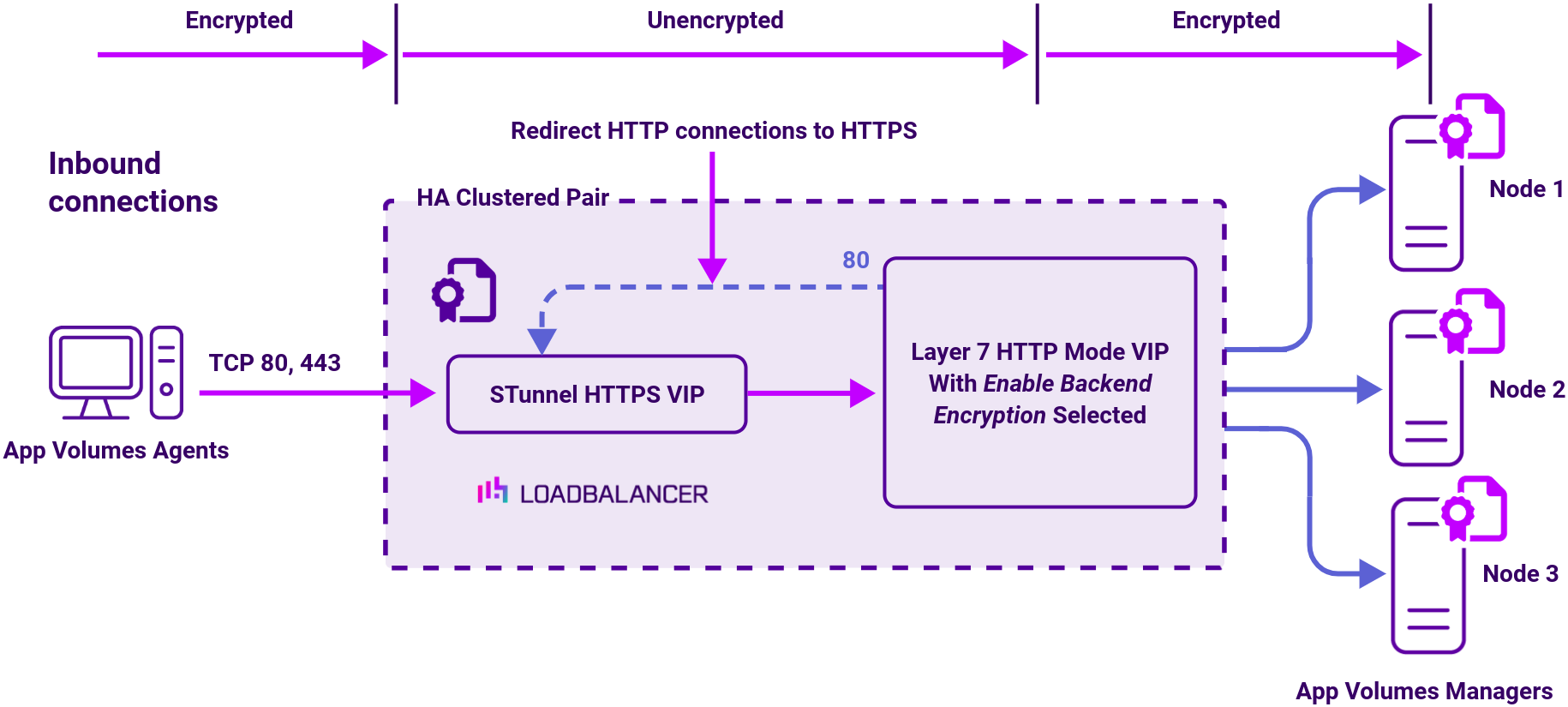
About Layer 7 Reverse Proxy
Layer 7 Reverse Proxy uses a proxy (HAProxy) at the application layer. Inbound requests are terminated on the load balancer and HAProxy generates a new corresponding request to the chosen Real Server. As a result, Layer 7 is typically not as fast as the Layer 4 methods.
Layer 7 is typically chosen when enhanced options such as SSL termination, cookie based persistence, URL rewriting, header insertion/deletion etc. are required, or when the network topology prohibits the use of the Layer 4 methods.
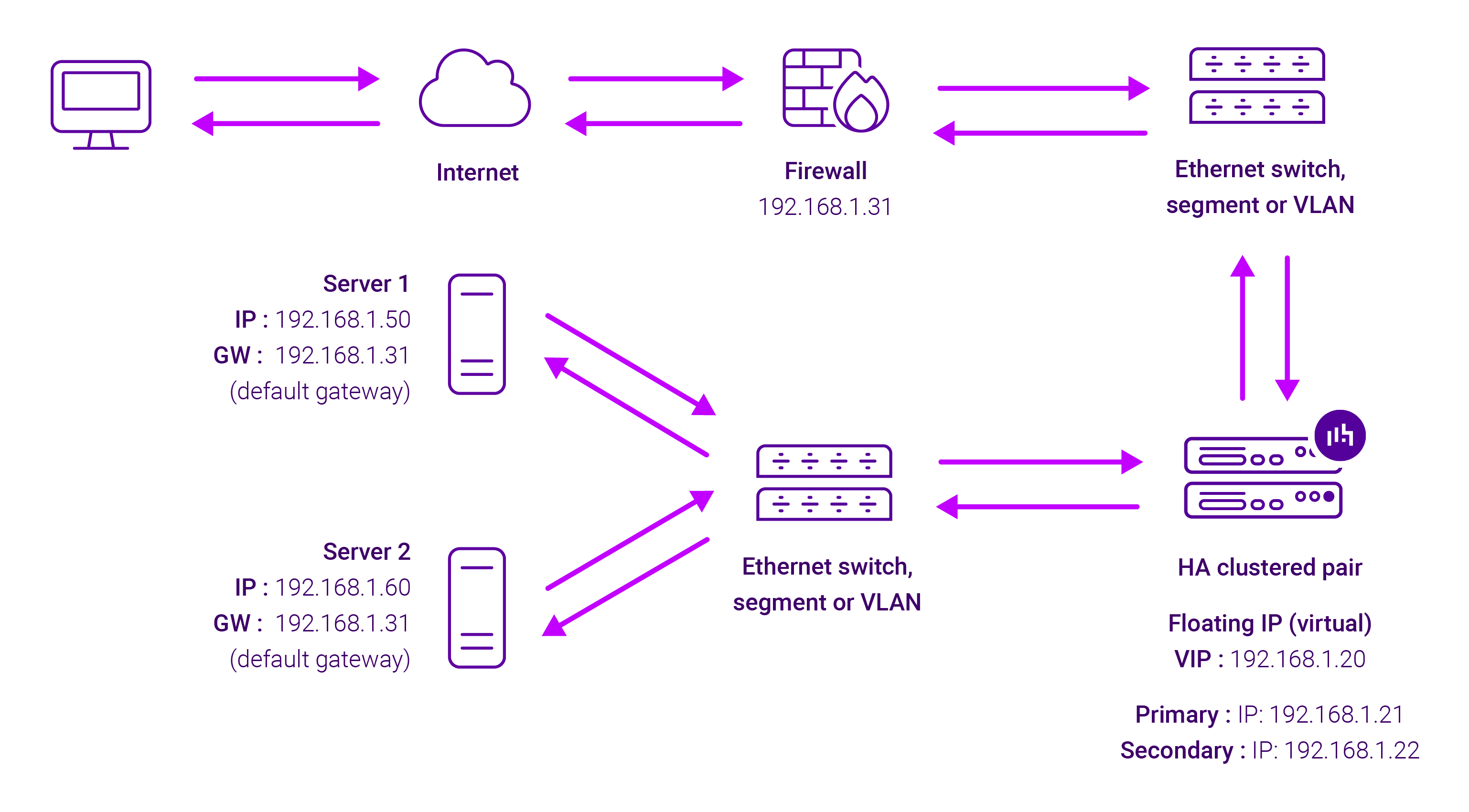
Because Layer 7 Reverse Proxy is a full proxy, any server in the cluster can be on any accessible subnet, including across the Internet or WAN.
Layer 7 Reverse Proxy is not transparent by default i.e. the Real Servers will not see the source IP address of the client, they will see the load balancer’s own IP address by default, or any other local appliance IP address if preferred (e.g. the VIP address). This can be configured per Layer 7 VIP.
If required, the load balancer can be configured to provide the actual client IP address to the Real Servers in two ways:
- Either by inserting a header that contains the client’s source IP address, or
- By modifying the Source Address field of the IP packets and replacing the IP address of the load balancer with the IP address of the client.
Layer 7 Reverse Proxy mode can be deployed using either a one-arm or two-arm configuration. For two-arm deployments, eth0 is normally used for the internal network and eth1 is used for the external network, although this is not mandatory.
No mode-specific configuration changes to the load balanced Real Servers are required.
Port translation is possible with Layer 7 Reverse Proxy e.g. VIP:80 → RIP:8080 is supported. You should not use the same RIP:PORT combination for Layer 7 Reverse Proxy VIPs and Layer 4 SNAT mode VIPs because the required firewall rules conflict.