
Load balancing UKG Pro Workforce Management
Updated on March 24, 2026
•
Published on March 6, 2026
Benefits of load balancing UKG Pro Workforce Management
The top three benefits of implementing load balancing for UKG Pro Workforce Management are:
- High Availability and resilience: Load balancing prevents a single point of failure. By distributing user traffic across multiple web or application servers, the system ensures that if one server goes down or requires maintenance, the load balancer automatically redirects users to a healthy node. This is critical for 24/7 operations where employees need to punch in/out or managers need to approve payroll without interruption.
- Scalability and performance optimization: UKG Pro is designed for global enterprises with massive data requirements. A load balancer optimizes performance by providing session persistence (ensuring a user stays connected to the same server during their session to prevent data loss or re-authentication issues), and traffic distribution (routing requests to the server with the lowest CPU utilization or the fewest active connections, preventing any single server from becoming a bottleneck during peak times like shift changes or Monday morning logins).
- Enhanced security through SSL offloading: Modern load balancers can handle the heavy lifting of SSL/TLS encryption and decryption. By terminating SSL at the load balancer level, the backend UKG servers are freed up from the computational burden of encrypting traffic. This not only speeds up the application but also provides a centralized point to manage security certificates and protect the internal network from direct exposure to the public internet.
About UKG Pro Workforce Management
UKG Pro Workforce Management (formerly known as UKG Dimensions) is a cloud-based suite of tools designed to help medium-to-large organizations manage their employees’ time, schedules, and labor productivity.
While a standard HR system might hold employee contract details and information, this platform handles the day-to-day reality of when and how employees actually work.
Why Loadbalancer.org for UKG Pro Workforce Management?
Loadbalancer’s intuitive Enterprise Application Delivery Controller (ADC) is designed to save time and money with a clever, not complex, WebUI.
Easily configure, deploy, manage, and maintain our Enterprise load balancer, reducing complexity and the risk of human error. For a difference you can see in just minutes.
And with WAF and GSLB included straight out-of-the-box, there’s no hidden costs, so the prices you see on our website are fully transparent.
More on what’s possible with Loadbalancer.org.
How to load balance UKG Pro Workforce Management
The load balancer can be deployed in 4 fundamental ways: Layer 4 DR mode, Layer 4 NAT mode, Layer 4 SNAT mode, and Layer 7 Reverse Proxy (Layer 7 SNAT mode).
For UKG Pro Workforce Management, using Layer 7 Reverse Proxy mode is recommended.
Virtual Service (VIP) requirements
To provide load balancing and HA for UKG Pro Workforce Management, the following VIP is required:
| Ref | VIP Name | Mode | Port(s) | Persistence Mode | Health Check |
|---|---|---|---|---|---|
| VIP 1 | UKG_Workforce_Web | Layer 7 Reverse Proxy (HTTP) | 80,443 | HTTP Cookie | HTTP (GET) |
Load balancing deployment concept
Once the load balancer is deployed, clients connect to the Virtual Service (VIP) rather than connecting directly to one of the UKG Pro Workforce Management web servers. These connections are then load balanced across the web servers to distribute the load according to the load balancing algorithm selected:
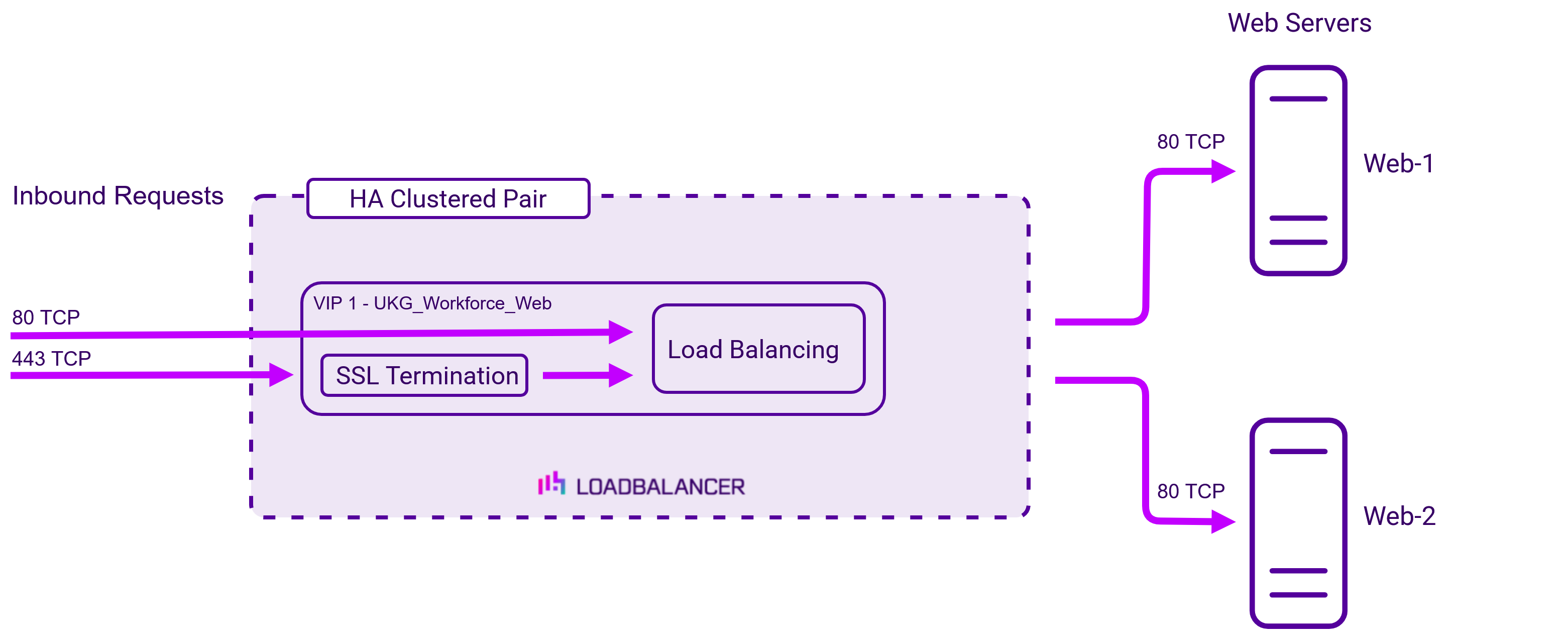
VIP 1 listens on ports 80 and 443 and is configured to terminate SSL. Certificates in PEM or PFX format can be uploaded to the load balancer.
About Layer 7 Reverse Proxy
Layer 7 Reverse Proxy uses a proxy (HAProxy) at the application layer. Inbound requests are terminated on the load balancer and HAProxy generates a new corresponding request to the chosen Real Server. As a result, Layer 7 is typically not as fast as the Layer 4 methods. Layer 7 is typically chosen when either enhanced options such as SSL termination, cookie based persistence, URL rewriting, header insertion/deletion etc. are required, or when the network topology prohibits the use of the Layer 4 methods. The image below shows an example network diagram for this mode.
The image below shows an example Layer 7 Reverse Proxy network diagram:
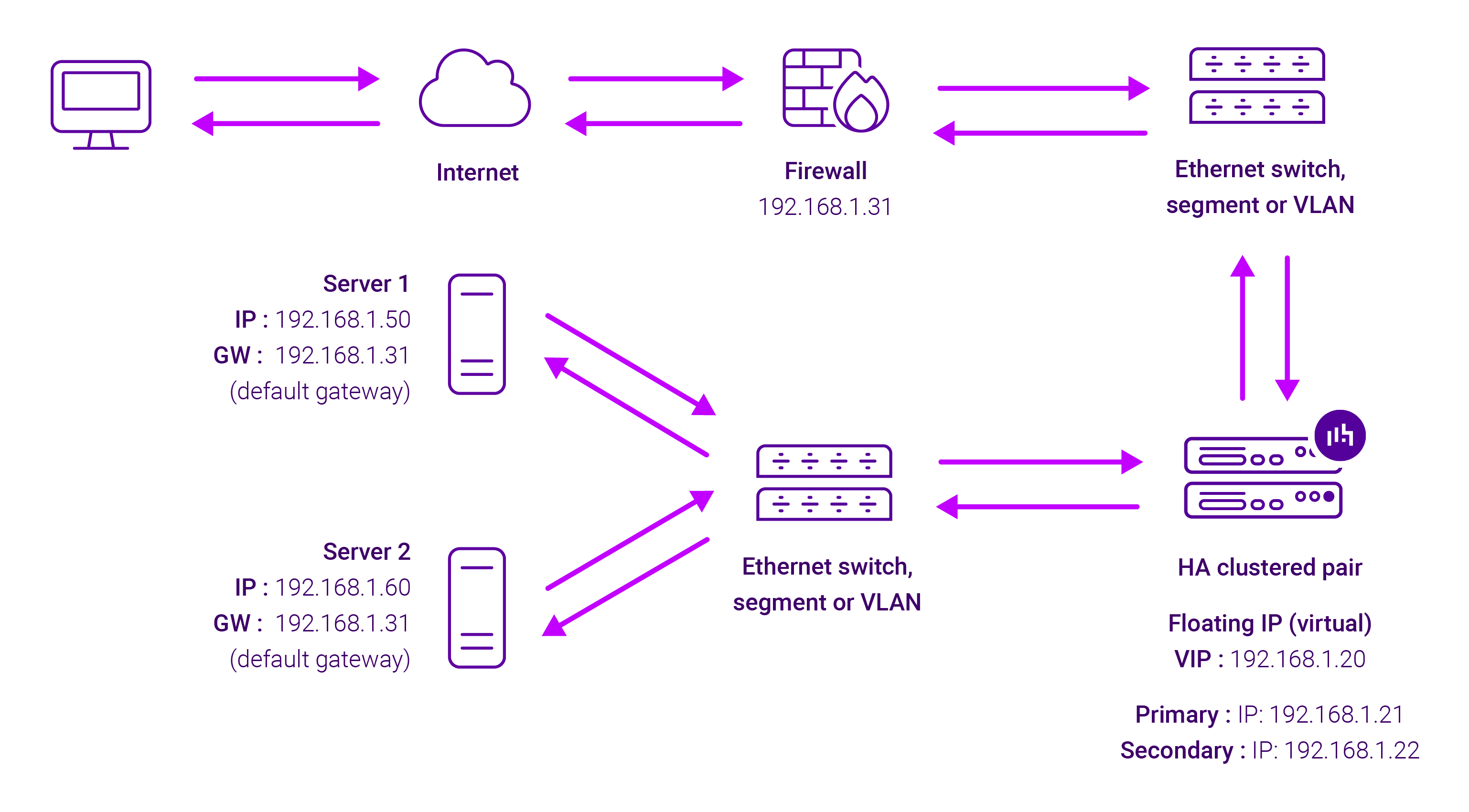
Because Layer 7 Reverse Proxy is a full proxy, Real Servers in the cluster can be on any accessible network including across the Internet or WAN.
Layer 7 Reverse Proxy is not transparent by default, i.e. the Real Servers will not see the source IP address of the client, they will see the load balancer’s own IP address by default, or any other local appliance IP address if preferred (e.g. the VIP address). This can be configured per Layer 7 VIP. If required, the load balancer can be configured to provide the actual client IP address to the Real Servers in 2 ways. Either by inserting a header that contains the client’s source IP address, or by modifying the Source Address field of the IP packets and replacing the IP address of the load balancer with the IP address of the client. For more information on these methods please refer to Transparency at Layer 7.
Requires no mode-specific configuration changes to the load balanced Real Servers.
Port translation is possible with Layer 7 Reverse Proxy, e.g. VIP:80 → RIP:8080 is supported.
You should not use the same RIP:PORT combination for Layer 7 Reverse Proxy VIPs and Layer 4 SNAT mode VIPs because the required firewall rules conflict.