
Load balancing Parallels RAS
Updated on March 27, 2026
•
Published on March 24, 2026
Benefits of using a third-party load balancer for Remote Access Server
While Parallels Remote Access Server (RAS) includes a capable High Availability Load Balancer (HALB) appliance, many enterprise environments prefer to opt for a third-party load balancer so they can benefit from the following:
- Global Server Load Balancing (GSLB): The built-in HALB is typically restricted to a single site or data center. This is adequate for small businesses, but a large enterprise with a global footprint will need a third-party load balancer that allows for geographic steering, proximity routing, and site failover across sites. That means if an entire data center were to go offline, the third-party global balancer could instantly redirect all traffic to a secondary site, providing true disaster recovery that exceeds the scope of a local HALB.
- Advanced Layer 7 Traffic Inspection & security: While the native HALB is excellent at routing traffic, third-party enterprise load balancers provide deeper Layer 7 (Application Layer) capabilities. Additionally, the load balancer can be paired with a Web Application Firewall (WAF) to inspect incoming traffic for SQL injection or cross-site scripting before it ever reaches the RAS gateways. Third-party balancers can also handle the initial authentication handshake or SSL offloading more robustly, ensuring only clean, authenticated traffic is passed into the internal network.
- Unified infrastructure & monitoring: For large IT departments, load balancer sprawl is a major headache. Using a third-party balancer offers the advantage of a single pane of glass, with the entire load balancer estate visible from a single interface, significantly simplifying management of the network. For more on how to reduce the complexity of managing a large load balancer estate, check out the ADC Portal.
About Parallels RAS
Parallels RAS (Remote Access Server) is a High Availability network architecture that utilizes multiple server instances working in tandem to provide seamless, load-balanced access to internal resources for remote users. By distributing incoming connection requests across a cluster of servers—rather than relying on a single gateway—it ensures that the system remains operational even if one node fails, effectively eliminating a single point of failure.
This setup is primarily used in large-scale enterprise environments where uptime is critical, such as healthcare systems requiring 24/7 access to patient records, financial institutions managing secure remote trading desks, and global corporations supporting thousands of telecommuters across different time zones. It is also a staple for Service Providers who need to scale their infrastructure dynamically to meet fluctuating user demands without interrupting the user experience.
Why Loadbalancer.org for Parallels RAS?
Loadbalancer’s intuitive Enterprise Application Delivery Controller (ADC) is designed to save time and money with a clever, not complex, WebUI.
Easily configure, deploy, manage, and maintain our Enterprise load balancer, reducing complexity and the risk of human error. For a difference you can see in just minutes.
And with WAF and GSLB included straight out-of-the-box, there’s no hidden costs, so the prices you see on our website are fully transparent.
More on what’s possible with Loadbalancer.org.
How to load balance Parallels RAS
The load balancer can be deployed in 4 fundamental ways: Layer 4 DR mode, Layer 4 NAT mode, Layer 4 SNAT mode, and Layer 7 Reverse Proxy (Layer 7 SNAT mode).
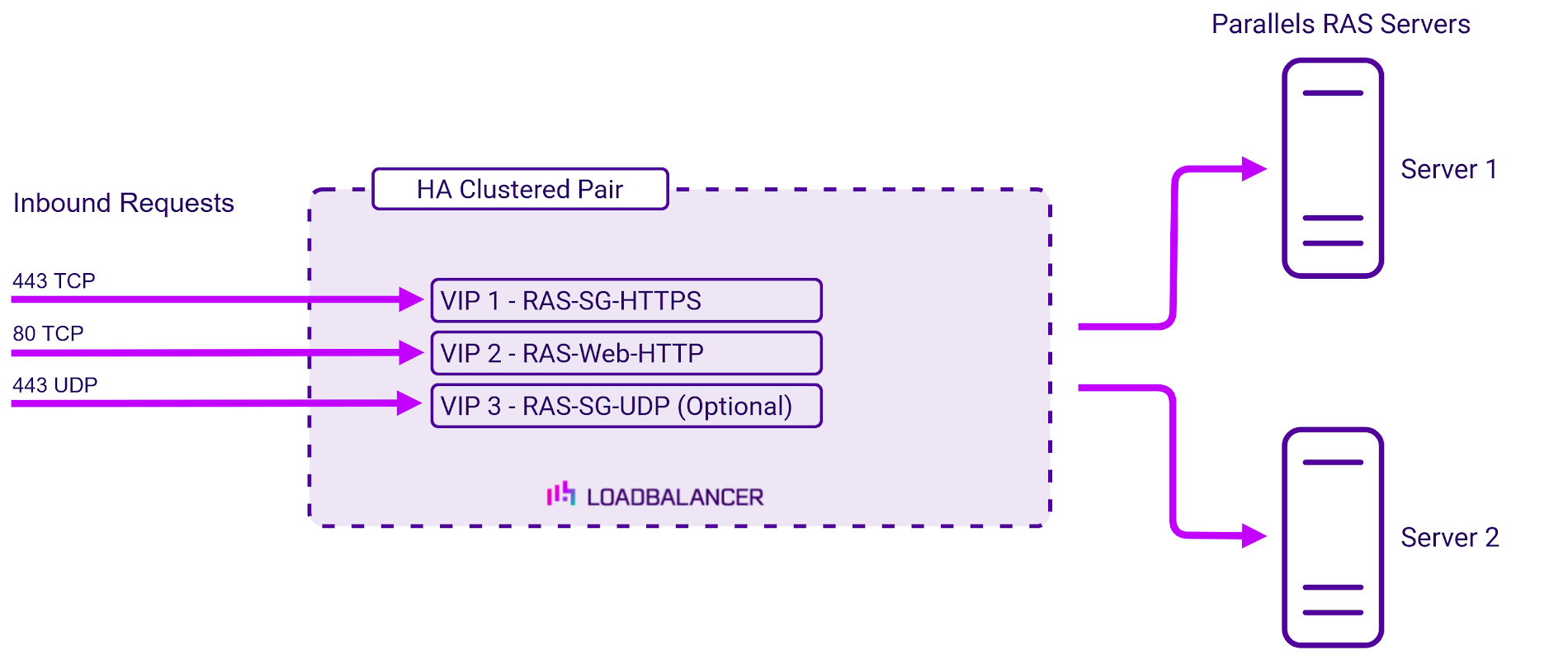
For Parallels RAS, Layer 7 Reverse Proxy mode is recommended for VIPs 1 and 2, and Layer 4 SNAT mode is recommended for VIP 3 (if used).
Virtual service requirements (VIPS)
The following VIPs are required:
| Ref. | VIP Name | Mode | Port(s) | Persistence Mode | Health Check |
|---|---|---|---|---|---|
| VIP 1 | RAS-SG-HTTPS | Layer 7 Reverse Proxy (TCP) | 443 | Source IP | Connect to Port |
| VIP 2 | RAS-Web-HTTP | Layer 7 Reverse Proxy (TCP) | 80 | Source IP | Connect to Port |
| VIP 3 | RAS-SG-UDP | Layer 4 SNAT (UDP) | 443 | Source IP | Ping server |
Note, VIP 3 is only required if UDP acceleration is used.
Load balancing deployment concept
About Layer 7 Reverse Proxy load balancing
Layer 7 Reverse Proxy uses a proxy (HAProxy) at the application layer. Inbound requests are terminated on the load balancer and HAProxy generates a new corresponding request to the chosen Real Server. As a result, Layer 7 is typically not as fast as the Layer 4 methods.
Layer 7 is typically chosen when enhanced options such as SSL termination, cookie based persistence, URL rewriting, header insertion/deletion etc. are required, or when the network topology prohibits the use of the Layer 4 methods.
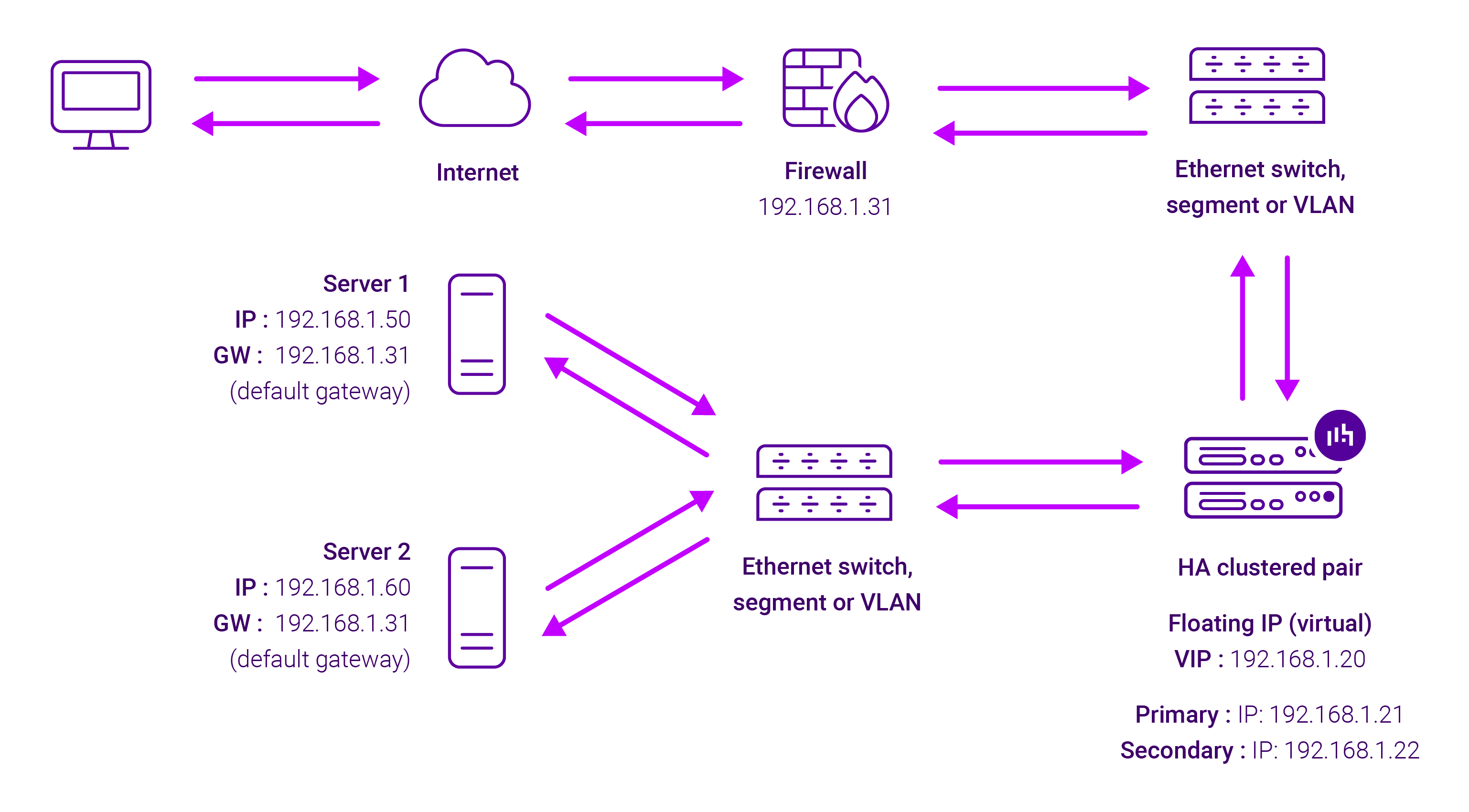
Because Layer 7 Reverse Proxy is a full proxy, any server in the cluster can be on any accessible subnet, including across the Internet or WAN.
Layer 7 Reverse Proxy is not transparent by default i.e. the Real Servers will not see the source IP address of the client, they will see the load balancer’s own IP address by default, or any other local appliance IP address if preferred (e.g. the VIP address). This can be configured per Layer 7 VIP.
If required, the load balancer can be configured to provide the actual client IP address to the Real Servers in two ways:
- Either by inserting a header that contains the client’s source IP address, or
- By modifying the Source Address field of the IP packets and replacing the IP address of the load balancer with the IP address of the client.
Layer 7 Reverse Proxy mode can be deployed using either a one-arm or two-arm configuration. For two-arm deployments, eth0 is normally used for the internal network and eth1 is used for the external network, although this is not mandatory.
No mode-specific configuration changes to the load balanced Real Servers are required.
Port translation is possible with Layer 7 Reverse Proxy e.g. VIP:80 → RIP:8080 is supported. You should not use the same RIP:PORT combination for Layer 7 Reverse Proxy VIPs and Layer 4 SNAT mode VIPs because the required firewall rules conflict.
About Layer 4 SNAT load balancing
Layer 4 SNAT mode is a high performance solution, although not as fast as Layer 4 NAT mode or Layer 4 DR mode. The image below shows an example network diagram for this mode:
Real Servers in the cluster can be on any accessible network including across the Internet or WAN. Layer 4 SNAT mode is not transparent, an iptables SNAT rule translates the source IP address to be the load balancer rather than the original client IP address. Layer 4 SNAT mode can be deployed using either a one-arm or two-arm configuration.
For two-arm deployments, eth1 is typically used for client side connections and eth0 is used for Real Server connections, although this is not mandatory since any interface can be used for any purpose. Requires no mode-specific configuration changes to the load balanced Real Servers. Port translation is possible with Layer 4 SNAT mode, e.g. VIP:80 → RIP:8080 is supported. You should not use the same RIP:PORT combination for Layer 4 SNAT mode VIPs and Layer 7 Reverse Proxy VIPs because the required firewall rules conflict.