Load balancing Hologic Unifi Workspace
Updated on February 3, 2026
•
Published on July 20, 2024
Benefits of load balancing Hologic Unifi Workspace
Load balancing Hologic Unifi Workspace provides:
- High Availability (HA): Load balancing is crucial for achieving High Availability (HA) by distributing traffic across multiple Unifi Workspace servers in a cluster. If one server fails, the load balancer automatically redirects all traffic to the remaining healthy servers. This prevents a single point of failure from causing an outage, ensuring radiologists can always access patient studies and worklists. The load balancer continuously monitors the health of each server, removing unresponsive or slow servers from the rotation until they are restored.
- Optimal performance and responsiveness: By distributing the workload, the load balancer prevents any single Unifi Workspace server from becoming overwhelmed by user requests or high-demand tasks, like loading large imaging studies. Spreading the processing load across the cluster ensures each server can respond quickly, resulting in faster image loading and smoother application interaction for radiologists. Work is routed to the server that is best equipped to handle the request, optimizing the utilization of compute resources across the entire cluster.
- Simplified scalability and maintenance: Load balancing makes the Unifi Workspace infrastructure flexible, allowing it to adapt to growing demand and simplify necessary administrative tasks. As the volume of studies or the number of users increases, you can add new Unifi Workspace servers to the cluster without interrupting service. The load balancer automatically incorporates them into the distribution. Servers can be temporarily taken offline for upgrades, patching, or maintenance without affecting system availability. The load balancer ensures all current and new user traffic is routed to the remaining active servers.
About Hologic Unifi Workspace
Hologic is an American medical technology company primarily focused on women’s health that sells medical devices for diagnostics, surgery, and medical imaging.
Unifi Workspace is a comprehensive reading solution for breast health diagnostics designed to enable more informed decision-making and improve workflow efficiencies for radiologists.
The application can be configured in two ways:
- Unifi Workspace Standalone System: Used primarily by radiologists to review medical images for screening and diagnostic mammography and digital breast Tomosynthesis.
- Unifi Workspace Cluster System: A Unifi Workspace system that works in
conjunction with one or more additional Workspace system(s) as part of a cluster. In a cluster environment, each Unifi Workspace system will have a specific role in the cluster.
The application went End of Life in 2022.
Why Loadbalancer.org for Hologic Unifi Workspace?
Loadbalancer’s intuitive Enterprise Application Delivery Controller (ADC) is designed to save time and money with a clever, not complex, WebUI.
Easily configure, deploy, manage, and maintain our Enterprise load balancer, reducing complexity and the risk of human error. For a difference you can see in just minutes.
And with WAF and GSLB included straight out-of-the-box, there’s no hidden costs, so the prices you see on our website are fully transparent.
More on what’s possible with Loadbalancer.org.
How to load balance Hologic Unifi Workspace
The load balancer can be deployed in four fundamental ways: Layer 4 DR mode, Layer 4 NAT mode, Layer 4 SNAT mode, and Layer 7 Reverse Proxy (Layer 7 SNAT mode).
For Unifi Workspace, Layer 7 Reverse Proxy is recommended.
About Layer 7 Reverse Proxy load balancing
Layer 7 Reverse Proxy uses a proxy (HAProxy) at the application layer. Inbound requests are terminated on the load balancer and HAProxy generates a new corresponding request to the chosen Real Server. As a result, Layer 7 is typically not as fast as the Layer 4 methods.
Layer 7 is typically chosen when enhanced options such as SSL termination, cookie based persistence, URL rewriting, header insertion/deletion etc. are required, or when the network topology prohibits the use of the Layer 4 methods.
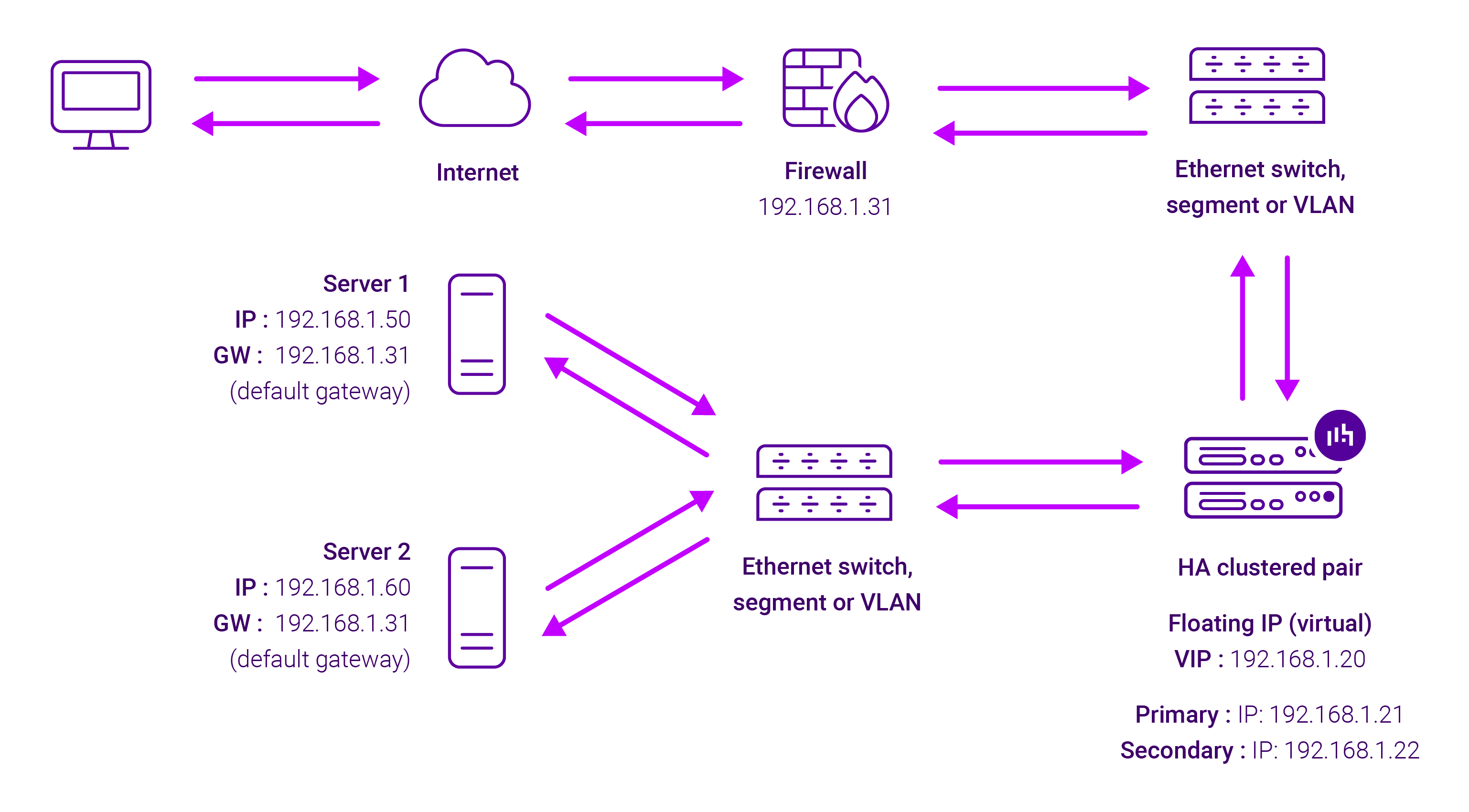
Because Layer 7 Reverse Proxy is a full proxy, any server in the cluster can be on any accessible subnet, including across the Internet or WAN.
Layer 7 Reverse Proxy is not transparent by default i.e. the Real Servers will not see the source IP address of the client, they will see the load balancer’s own IP address by default, or any other local appliance IP address if preferred (e.g. the VIP address). This can be configured per Layer 7 VIP.
If required, the load balancer can be configured to provide the actual client IP address to the Real Servers in two ways:
- Either by inserting a header that contains the client’s source IP address, or
- By modifying the Source Address field of the IP packets and replacing the IP address of the load balancer with the IP address of the client.
Layer 7 Reverse Proxy mode can be deployed using either a one-arm or two-arm configuration. For two-arm deployments, eth0 is normally used for the internal network and eth1 is used for the external network, although this is not mandatory.
No mode-specific configuration changes to the load balanced Real Servers are required.
Port translation is possible with Layer 7 Reverse Proxy e.g. VIP:80 → RIP:8080 is supported. You should not use the same RIP:PORT combination for Layer 7 Reverse Proxy VIPs and Layer 4 SNAT mode VIPs because the required firewall rules conflict.